Quantcast
Channel: StackStorm
Viewing all 302 articles
Browse latest View live

StackStorm 2.3: Something for Everyone!

$
0
0

June 19, 2017
By Lindsay Hill

StackStorm 2.3 is out, and there’s something in it for everyone. Big API improvements for developers, Web UI fixes for users, and RBAC & LDAP enhancements for Enterprise customers. Plus plenty of pack changes for everyone. Here’s the full details:

Changes For Everyone!

API Overhaul

We know, we know, we’ve been promising API documentation forever. Well, here it is: api.stackstorm.com.
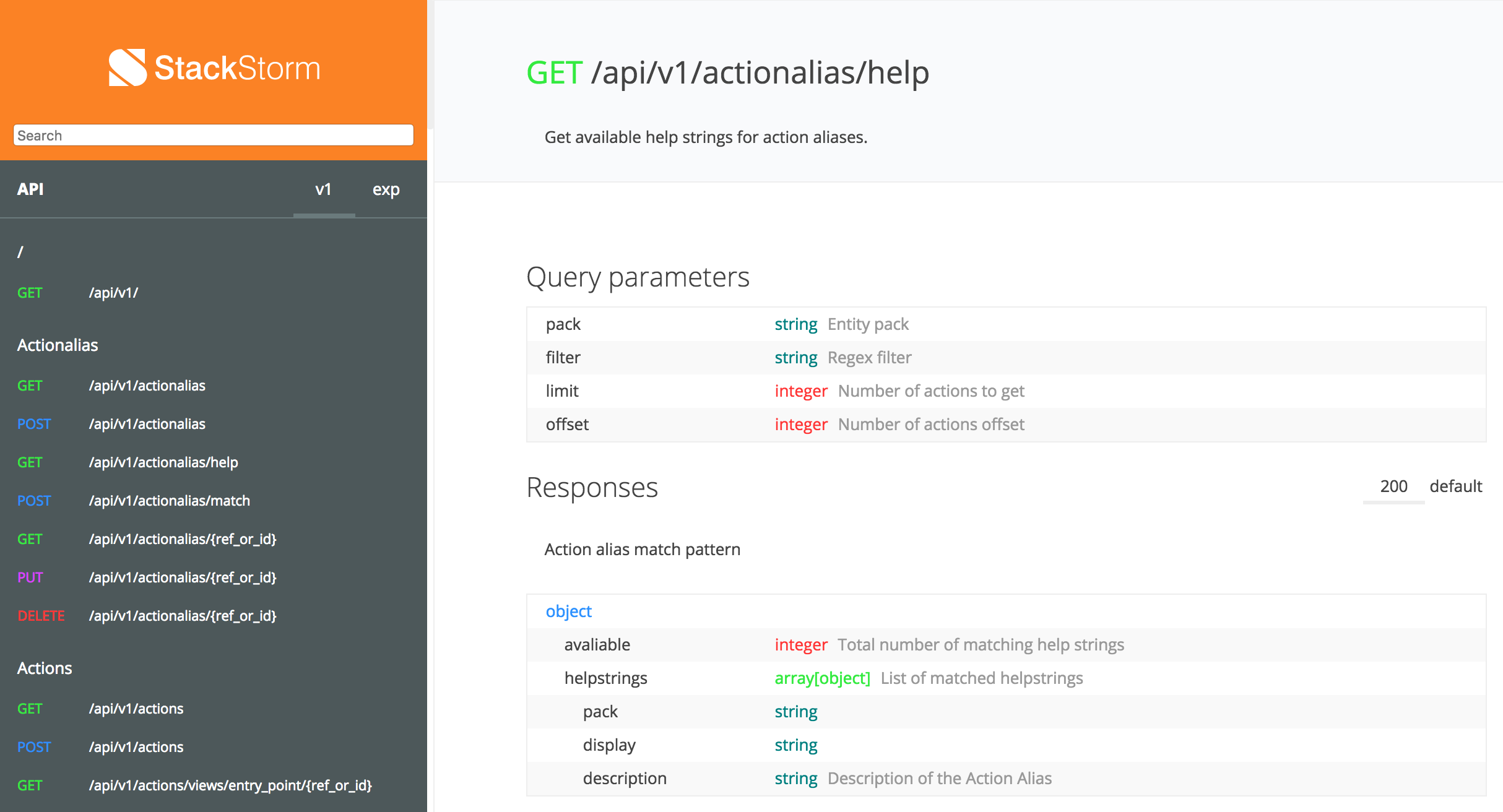
But there’s a lot more going on here than just API documentation. With one of our largest ever Pull Requests, touching 108 files (!), Kirill has completely overhauled the way our APIs are defined and maintained. We are now using the OpenAPI specification (formerly known as Swagger). This is good for everyone in the long run: Less maintenance for us, auto-generated clients & documentation for users, and simpler, more reliable code that uses a common standard.

Web UI Improvements

The web UI has had some love. First, thanks to Sahil Lele for PR 351. This makes it much easier to review execution output in the Web UI. It adds buttons for wrapping long lines, and hiding/displaying newline characters.

Here’s what a typical execution output looked like before:

See the stderr output in the middle, that scrolls off to the right? Difficult to read, right? Let’s see what happens when we click the new “WRAP LINES” button:

Looking better already. But those \n characters are annoying. So let’s click “SHOW NEWLINES”:

Much more readable!

Here’s a few other changes we’ve made:

  • Actions parameters are now listed with required parameters first, followed by alphabetical order
  • Drop-down lists now work properly on Windows browsers (Yes. Yes, in 2017, cross-platform browser compatibility is still a hassle).
  • You can now enter an array of objects as a parameter

Pack-Related Changes

We’ve made a few changes to pack configuration and management. Here’s some things to watch out for:

  • Packs that use the old-style config.yaml will now generate a warning on reload. Version 2.4 will raise a fatal error if you still have the old-style configuration. Upgrade any remaining packs to config.schema.yaml now. Check the docs for details.
  • If your config.schema.yaml defines an item as having a default value, but required: false, it will now return that default value if you didn’t define it in your configuration. Makes much more sense than the previous approach, where the default value was only returned if you had required: true.
  • Invalid semver version strings (e.g. 2.0) are no longer supported. You must switch to full semver-style version strings, e.g. 2.0.2. This was originally deprecated in StackStorm v2.1.0.
  • The dest_server parameter has been removed from the linux.scp action. Going forward simply specify the server as part of the source and / or destination arguments.
  • New actions in the ChatOps pack: chatops.match, chatops.match_and_execute and chatops.run.

New RBAC/LDAP Features

Lots of improvements here for our Enterprise users. The biggest one is that you can now automatically grant roles, based upon LDAP group membership. This makes it much simpler to manage users in LDAP environments. Just add new users to the right groups in LDAP/AD, and they’ll get granted the right roles.

We’ve added new API and CLI options to retrieve user role assignment information. Check out commands like st2 role list, st2 role-assignment-list, and more. Actions run through the API will also now include the rbac dictionary with user and roles_action_context attributes.

We’ve also added RBAC controls for more endpoints, such as traces, API_KEY_CREATE, timers, webhooks, policies and more.

Thanks to one of our favorite customers for their help developing & testing these capabilities.

Note: RBAC, LDAP and Workflow Designer are only available in Brocade Workflow Composer. Check this table for feature comparison, and sign up for a free 90-day trial.

Miscellaneous Bugfixes & Improvements

Here’s a few smaller bugfixes and improvements:

  • You can now provide a custom list of attribute names to mask in log messages, by setting the log.mask_secrets_blacklist configuration option.
  • Trigger payload validation can now be disabled (you were always meant to be able to, but that was broken).
  • Lower default TTLs can be set for user access tokens.
  • Variables and parameter values now support non-ASCII (Unicode) characters.
  • Fixed bug with querying Mistral task status that could result in 100% CPU usage.

And as always, here’s the full changelog.

New & Updated Packs

We’ve added quite a few new and updated packs over the last few months. Here’s just a few:

New packs:
* Active Directory thanks to Nick @ Encore Technologies
* Netbox – DigitalOcean IPAM tool
* A10 – A10 ADC
* Prometheus – Prometheus Monitoring/TSDB

Updates:
* PagerDuty – new library, APIv2 and aliases. If you’re using PagerDuty, you must upgrade before PagerDuty shuts down their old API.
* Kubernetes – updates for v1.5.
* Kafka – GCP Stackdriver support.
* AWS – ChatOps aliases.
* Azure – Resource Manager support.

NB: All Exchange packs have been updated to use config.schema.yaml. You should upgrade your packs, and migrate their configuration before StackStorm 2.4 is released.

A Thank You

As ever, thank you to you, our user, contributors and friends, for the bug reports and code contributions. Here’s just a few of those who’ve helped out recently:
Cody A Ray, Andrew Regan, John Anderson, Sean Reifschneider, Carles Figuerola, Anthony Shaw, Nick Maludy, nullkarma

There are many others, and we have not forgotten you. Thanks for everything you do!

How Do I Upgrade?

As usual: Backup first. You can then use apt/yum to upgrade the ST2 packages.

A few things to watch for:

  • Pack validation has been tightened up with recent versions. You may need to modify your packs, especially if you’re upgrading from pre-2.1 versions. Pay attention to warnings and errors when ST2 is restarted. A good design pattern is to set up a new ST2 system, and load your packs and workflows into that system, to check that everything validates correctly.
  • Update the st2 pack before starting the rest of the upgrades, with st2 pack install st2

Read the general upgrade guidelines, and check the version-specific upgrade notes for more details.

If you run into problems, join our Slack community for help.

So What’s Next?

We’re already working on our next release. Our current plan is to knock off some of the annoying little bugs and issues that have been hanging around for a while. It’s not as exciting as new features, but we know that it makes a real difference to you. If you’ve got a pet-peeve, make sure that it’s logged – or if someone else has already logged it, add a ‘+1’.

We are working on features too: major ones are Pack installation & configuration via the Web UI, and a new st2.ask feature, which will let you pause workflows and seek approval before continuing.

Questions/issues/suggestions for new features? Hit us up on Slack, or via GitHub.

The post StackStorm 2.3: Something for Everyone! appeared first on StackStorm.

Autoscaling Swarm on AWS with StackStorm

$
0
0

June 22, 2017
by Dmitri Zimine

In this blog, we show how to scale out a Docker Swarm Cluster based on container workload, so that you don’t over-provision your AWS cluster and pay for just enough instances to run your containers. Learn how we achieved this, watch the 2 min video to see it in action. Read the blog for details. Grab our code recipe and adjust it to your liking and use to auto-scale your Swarm on AWS.

Capacity planning is a lost battle. With uneven, unpredictable workloads, one just can’t get it right: either over-provision and pay for extra capacity, or under-provision and make users suffer with degraded services. Pick how you lose your money.

Orchestrators such as Docker Swarm and Kubernetes are here to solve the capacity problem. They let you scale the services easily and effectively, creating container instances on demand and scheduling them on the underlying cluster.

Scaling a service is really easy with Docker Swarm: one command, or one API call


docker service scale redis=4

But what if you run the cluster on AWS, or other public cloud? You have to provision a cluster of ec2 instances and do capacity planning again. Which is a lost battle. Amazon auto-scaling groups is little help, they lose their “auto” magic in case of orchestrators: Elastic Load Balancer is typically irrelevant for Kubernetes and Swarm; and the standard utilization-metric based scaling via CloudWatch alerts becomes inefficient and even dangerous [ 1 ].

Wouldn’t it be great if the cluster can scale based on the container load? If an orchestrator automagically adjusted the size of the cluster by adding more nodes to handle more load,so that all containers have a node to run and there are no idle nodes? Wouldn’t it be great to not have to pay for idle capacity? Absolutely! Kubernetes does exactly this natively on AWS and Azure via auto-scaler.

Docker Swarm? no such luck. There’s nothing like the k8b auto-scaler out of the box. But don’t rush to throw away your Docker Swarm. We can help you make it auto-scale. It’s easy with StackStorm, and we will walk you thru on “how exactly” in the rest of this blog.

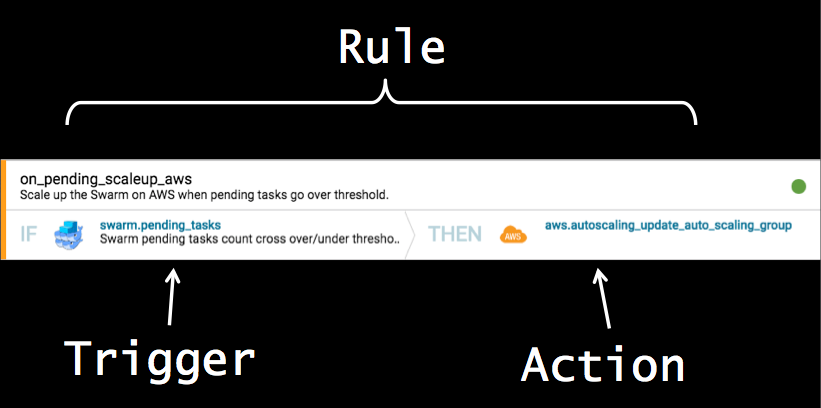
The idea is simple: When the cluster fills up on load, create extra worker nodes and add them to the cluster. Swarm will take it from there and distribute the load on workers. An IFTTT-like rule: If a cluster is full, then add worker nodes.

The right task for StackStorm. Just specify a few things precise enough for implementation:

1) How to define a “cluster filled up” event? A scaling trigger is defined as “too many pending tasks”, or, more strictly, “a count of pending tasks is going above a threshold”. A trigger is emitted by StackStorm “swarm.pending_queue” sensor that polls the Swarm for unscheduled tasks and fires when the count goes above threshold (scale-out) or below threshold (scale-in).

2) How to make the swarm cluster tell us that it is “filled up”? If not given a hint, a swarm scheduler thinks the cluster is bottomless and never stops shoveling the containers on the workers. Swarm CPU shares don’t help: they are modeled after VMware and act exactly as shares; the scheduler still shedule everything, just keep the share-based ratio. Solution? Use memory reservations, and watch “pending tasks” count. Memory is not over-provisioned by default; the scheduler will schedule only the tasks the workers can fit, the rest will be “pending tasks”, waiting for resources (memory) to become available. This will trigger swarm.pending_queue described above.

3) How to create and add worker nodes? I chose to use Auto Scaling Groups as a tried and trusted way to scale on AWS, but drop the “auto-” and trigger scaling events from StackStorm. The launch configuration uses a custom AMI with Docker daemon installed and set up, so that new worker instances come up fast. A new node auto-joins the cluster via cloud-init when the instance comes up [ 2 ].

Using ASG is not the only way: you could easily provision new worker instances with st2 workflow, that offers more control over the provisioning process. Or use ASG for creating the node and set up an st2 rule to join a worker to the cluster on ASG lifecycle events. It is your choice: pick an event, set your rules, build your workflows: define a process that matches your operations.

4) How to define autoscaling rule? Rule is simple and self-explanatory:

---
name: on_pending_scaleup_aws
pack: swarm
description: "Scale up the Swarm on AWS when pending tasks go over threshold."
enabled: True
 
trigger:
    type: swarm.pending_tasks
    parameters: {}
 
criteria:
    # Crossing threshold up
    trigger.over_threshold:
        type: equals
        pattern: True
 
action:
    ref: aws.autoscaling_update_auto_scaling_group
    parameters:
        AutoScalingGroupName: swarm-workers-tf
        DesiredCapacity: "{{ st2kv.system.count | int + 1 }}"

5) How to simulate a workload? Easy: just tell the swarm to scale the service! Create one with memory reservations and scale it out to to fill up the cluster.

docker service scale redis=4

Now everything is ready. Watch the video to see it all in action.

What about scale-in? I will cover it in the next post. Stay tuned. In the mean time, you can write your own, and win a prize from StackStorm.

You can do it in different ways, on different triggers, using different empirics to constitute a scale-in event. For instance, on queue count going down, wait for chill-down time, drain the node and destroy the worker – a simple 3-steps “workflow” action. Or, configure the Swarm with “binpack strategy” and run a scale-down-if-i-can workflow that checks the number of containers on the nodes and decomissions the empty nodes. Or just reduce the AWS desired capacity (if capacity is over-reduced, the scale-up rule will bring it back). With StackStorm, you define your process to fit your tools and operations.

StackStorm challenge: create your own Swarm scale-up&down solution and share with the StackStorm community. We will send you a prize. Mention @dzimine or @lhill on [Slack](https://stackstorm-community.slack.com) or drop us a line at moc.mrotskcatsnull@ofni.

In summary: with this simple StackStorm automation, you can make your Swarm Cluster scale out on AWS with the load, taking exactly as much resources as needed. And more: once you have StackStorm deployed, you will likely find more use to event-driven automation: StackStorm is used for a wide range of automations, from auto-remediation, network automation and security orchestration to serverless, bio-computations, and IoT.

Give it a try and tell us what you think: leave the comments here or join stackstorm-community on Slack (sign up here to talk to the team and fellow automators).

References

  • Autoscaling code and rules in StackStorm automation pack.
    • Code on GitHub: https://github.com/dzimine/swarm_scaling
    • To install the pack:
      st2 pack install --base_url=https://github.com/dzimine/swarm_scaling
  • Auto-scaling group terraform definition https://github.com/dzimine/serverless-swarm – run the whole thing to install Swarm, StackStorm and AWS ASG, or look at the moving parts:

Footnotes

  1. Research shows that utilization-threshold based scaling often results in instabilities, SLA violations and service unavailability. For instance, see From Data Center Resource Allocation to Control Theory and Back
  2. For the demo, I used provisioning from serverless-swarm. The complexity of ansible/terraform there is relevant to serverless-swarm goals, where we achieved exactly equivalent AWS and local Vagrant configuration. If it is an overkill for your case, provision Swarm and StackStorm your way, and just grab the AWG portion and cloud-init from the template.

The post Autoscaling Swarm on AWS with StackStorm appeared first on StackStorm.

June StackStorm Exchange Update

$
0
0

July 3, 2017
by Lindsay Hill

Hey folks, just a quick roundup of happenings on the StackStorm Exchange for the month of June. New packs, updates to existing packs, and a reminder about changes to pack configuration.

First, the New Packs:

  • Netbox – DigitalOcean IPAM
  • ActiveDirectory – pretty much any action you’d like to run against Active Directory
  • Microsoft Exchange – send email, trigger events when email received, get calendar items

Updates to Existing Packs

  • Ansible – JSON support in extra_vars.
  • AWS – ChatOps aliases, updates to the action generator scripts to handle new actions, and simplifications to the README.
  • CSV & XML – new parse_file actions to simplify loading data from file.
  • Email pack – TLS is now optional. Of course you should use TLS, if you can. But if you insist, now you don’t have to use it.
  • Jira – in a similar vein to the above, you can now disable Jira SSL certificate validation, if you are so inclined.
  • Kafka – GCP Stackdriver support.
  • Kubernetes – fixes include payload validation, support for Kubernetes 1.5.

Other Changes:

  • Many packs have updated to use action runner python-script, rather than run-python. No change in functionality, but it removes a deprecated runner alias, and standardises things. Consistency is good.
  • Don’t forget about the move to config.schema.yaml. If you have older pack versions using config.yaml files, you must migrate to the new configuration style. The old style will not work with the upcoming StackStorm 2.4.

Thinking about submitting a new pack? We’d love to see it! Just open a PR against github.com/StackStorm-Exchange/exchange-incubator, and we’ll help you through the rest of it.

The post June StackStorm Exchange Update appeared first on StackStorm.

StackStorm 2.3.1: Bug Smashing

$
0
0

July 6, 2017
by Lindsay Hill

Hot on the heels of StackStorm 2.3, we have pushed out StackStorm 2.3.1. Bugs squashed, a few useful small changes. Here’s a few of the highlights:

Additions & Changes:

  • The remote-shell-script runner now supports passphrases for SSH keys.
  • New json_escape filter for escaping JSON strings.
  • Most of our CLI commands will limit the output to 50 items. But they didn’t always tell you if there were more than 50 results available. Now they do.
  • Position parameters in actions must now be unique, and sequential. They always should have been, but now we enforce that. You’ll get a warning if you try to register actions with invalid position entries.
  • st2api whole API responses are now logged at DEBUG level. The default logging level is INFO, so this reduces clutter.

Bugfixes

There are always bugs. But maybe now there are a few less.

  • st2 action-alias delete now works. It was broken in 2.3, and you had to delete aliases via API.
  • st2ctl register sometimes failed to register rules, resulting in errors that could never be re-created. Annoying, and now fixed.
  • The config loader didn’t like config schema default boolean values that were False. It got confused. I got confused. It is now fixed.

Full details in the Changelog.

We’re now getting into the next release – this will probably be 2.3.2, which will be more bugfixes and small changes. If you have any favorite bugs you need fixed, please make sure to highlight them on GitHub. No issue logged == no bug, OK? And do let us know if anything already logged is affecting you. Give it a +1. Our very scientific processes do take that into account when picking bugs to fix.

Upgrading

Packages are now available in apt and yum repos. Make sure you backup first, and check the upgrade notes, especially if you’re upgrading from pre-2.2.

As always, if you run into any problems, get in touch via Slack or GitHub.

The post StackStorm 2.3.1: Bug Smashing appeared first on StackStorm.

StackStorm 2.3.2: Summer of Bugfixes Continues

$
0
0

July 29, 2017
by Lindsay Hill

The Summer of Bugfixes continues here at StackStorm. The team has put together another patch release, fixing a few annoyances, cleaning up some old bugs, and making StackStorm all-around easier to use. Read on for some of the notable changes:

Additions & Changes:

  • New Jinja filter: regex_substring – this will search for a pattern, and return the result, rather than just True|False.
  • The st2 CLI will now display a note “there are more results” if you use the -n flag, and more items are available. This makes for a more consistent experience, and makes sure that you know that you’re not seeing all results. Previously we only displayed this message if you did not request any limit, or requested a higher number than the default (50).
  • You can now explicitly set stream_url using st2client and the st2 CLI.

Bugfixes

More fixes, including a personal interest bug for me: proxies.

  • Pack installation now works out of the box with proxies. Check the docs for more details.
  • Pack install now works with private repos that don’t contain a .git suffix.
  • Another Unicode fix: this time it’s st2client displaying Unicode in pack descriptions.
  • API fixes: more checks to validate data. You always send properly formed data, so this won’t affect you, right? Right?

Full details in the Changelog.

Much love to those in our community who contributed with bug reports, issues and code. It means a lot to us.
Our current thinking is that we’ll have 2.3.3 release in the next few weeks. More bugfixes and minor cleanups, so don’t forget to log issues and/or vote on existing ones.

We’re also working on features for the next major release. Some WIP code is already available for Pack UI, Timezone support in st2web, st2.ask and Mistral pause & resume. Look for version 2.4 in September.

Upgrading

Packages are now available in apt and yum repos. Make sure you backup first, and check the upgrade notes, especially if you’re upgrading from pre-2.2. Make sure you check your packs for upgrades too. The community continues to enhance our packs, and system upgrades are also a good time to look at pack changes.

As always, if you run into any problems, get in touch via Slack or GitHub.

The post StackStorm 2.3.2: Summer of Bugfixes Continues appeared first on StackStorm.

July Exchange Update

$
0
0

July 31st, 2017
by Lindsay Hill

The StackStorm Exchange saw several new packs during July, along with some updates to old favorites. Read on for a roundup of interesting happenings:

New Kids on the Block:

  • Men & Mice – Actions for working with the Men & Mice IPAM
  • Tuleap – work with the Tuleap project management system
  • NSX & VDX Hardware VTEP deployment packs. Check the README for full details

Updates to Existing Packs

  • Acos – Multiple new actions to make it easier to work with your A10 ADCs.
  • Bitbucket – now has a sensor for monitoring Bitbucket repositories. In a related move, the Github sensor now works properly with Enterprise Github servers.
  • DigitalOcean – the pack now converts the DigitalOcean objects into dicts & lists that st2 can work with.
  • Email – you can now specify multiple To: addresses. We’re also working on a complete overhaul of the pack configuration, to make it more intuitive.
  • HPE ICSP now includes actions for getting a list of currently registered servers, and deleting servers.
  • Netbox – new actions for getting next available IP.
  • Sensu pack has been cleaned up & updated, with updated Sensu libraries.
  • Slack pack supports 51 new Slack API actions.
  • Solarwinds Orion – new actions to get node ID and asset inventory.
  • Splunk now returns structured search results, making it much easier to work with.

I’ve also been adding example configuration files to some of those packs that were missing them. This makes it a little easier to understand the configuration, and it improves our testing coverage.

Review & Upgrade

If you’re using any of the above packs, we encourage you to update to the latest fixes & features. Pay attention to any configuration or usage changes – you may need to update your workflows.

Don’t forget about the move to config.schema.yaml. If you have older pack versions using config.yaml files, you must migrate to the new configuration style. The old style will not work with the upcoming StackStorm 2.4. All packs in the Exchange support this new style.

Thanks as always to those Community members who contributed packs and fixes.

Thinking about submitting a new pack? We’d love to see it! Just open a PR against github.com/StackStorm-Exchange/exchange-incubator, and we’ll help you through the rest of it.

The post July Exchange Update appeared first on StackStorm.

StackStorm Centralized Logging with Graylog

$
0
0

August 22, 2017
By Nick Maludy of Encore Technologies

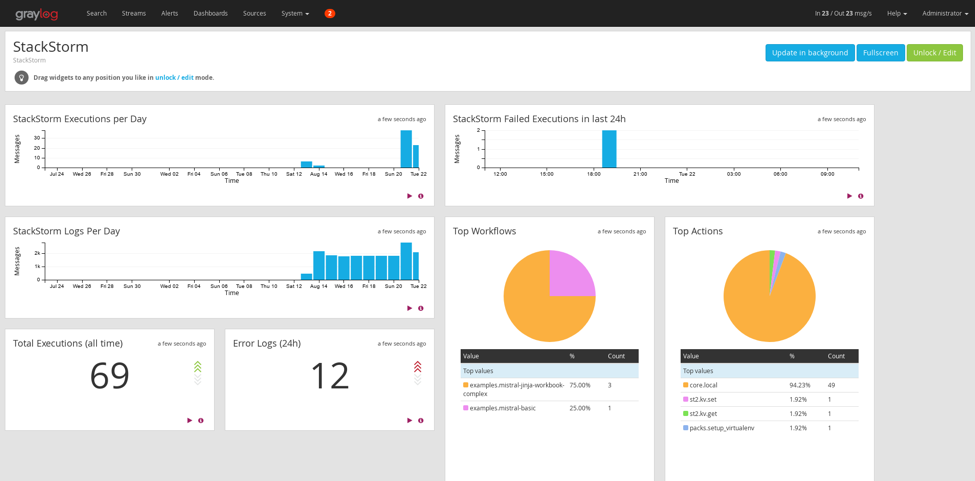
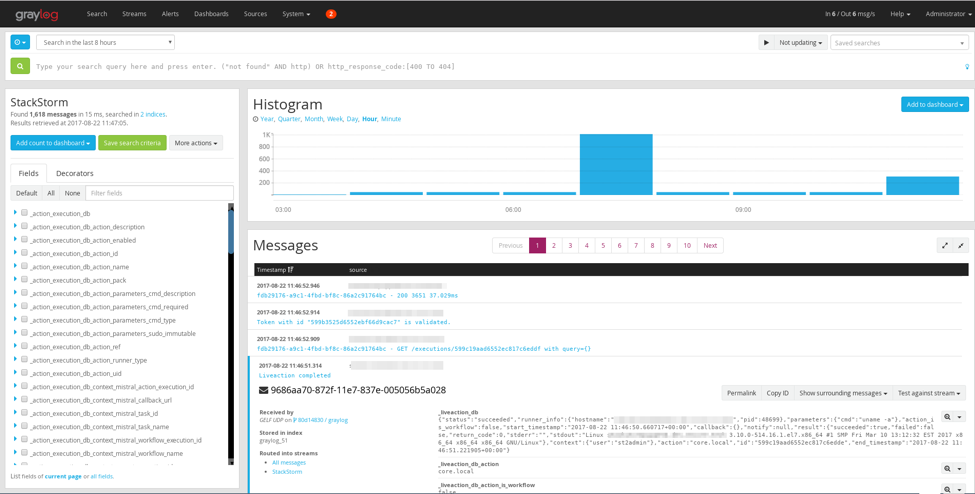
Want to implement centralized logging for your StackStorm deployment? Read on to find out how to send your StackStorm logs to Graylog, and produce pretty dashboards like this:

Background: Centralised Logging and StackStorm

One of the pillars of modern application deployments is aggregating its logs in a centralized logging application such as ELK stack, Splunk or Graylog. Centralized logging allows engineers to format, index and query logs from across their stack and distributed applications and be able to access them in a single pane of glass. StackStorm is a distributed application with multiple services that can benefit greatly from centralized logging aggregation. In this blog post, we’ll investigate how to configure StackStorm to output structured logs, setup and configure Fluentd to ship these logs, and finally configure Graylog to receive, index and query the logs.

Structured Logging

Structured logging is a fancy term for writing log output from an application in JSON format. When logs are output in JSON this gives context for all of the information contained in each log message. This context allows log shippers to save precious CPU cycles by not having to parse out this information from plain text logs. It also allows centralized logging applications to effectively index the logs and provide it with multiple fields with which to query.

To demonstrate the difference between plain text logs and structured logs we’ll take an example from st2api. Below is an example of a standard log message that is written to /var/log/st2/st2api.log:

2017-08-19 11:16:38,767 83927760 INFO mixins [-] Connected to amqp://guest:**@127.0.0.1:5672//

As you can see this has some information such as the timestamp, log level, and several other fields. If we were to try to utilize this in some meaningful way a parser would need to be written to extract the data fields. If the log message was instead written in a standard format (JSON) we could easily parse it and quickly make meaningful use of the fields within the message. Below is the structured logging message that corresponds to the plain text log from above.

{"version": "1.1", "level": 6, "timestamp": 1503174203, "_python": {"name": "kombu.mixins", "process": 76071, "module": "mixins", "funcName": "Consumer", "processName": "MainProcess", "lineno": 231, "filename": "mixins.py"}, "host": "stackstorm.domain.tld", "full_message": "Connected to amqp://guest:**@127.0.0.1:5672//", "short_message": "Connected to %s"}

This is great, but kind of hard to read. Below is the same log message formatted in a way that’s easier to read.

{
  "version": "1.1",
  "level": 6,
  "timestamp": 1503174203,
  "_python": {
    "name": "kombu.mixins",
    "process": 76071,
    "module": "mixins",
    "funcName": "Consumer",
    "processName": "MainProcess",
    "lineno": 231,
    "filename": "mixins.py"
  },
  "host": "stackstorm.domain.tld",
  "full_message": "Connected to amqp://guest:**@127.0.0.1:5672//",
  "short_message": "Connected to %s"
}

This output is in GELF (Graylog Extended Logging Format) JSON format. GELF log messages are nothing more than JSON with a few standard fields in the payload. The GELF payload specification can be found here. GELF also defines two wire protocol formats, GELF UDP and GELF TCP that detail how GELF JSON log messages can be sent to Graylog.

Log Shippers

A log shipper is an application that reads in log messages from some source, usually a log file, potentially transforms the message and then transmits it to some destination, usually a log aggregation or centralized logging application. There are several commonly used log shippers out there including Fluentd, Logstash, and Filebeat.

In this article we’re going to be using Fluentd because it was the easiest one to configure for parsing GELF JSON and shipping to Graylog.

Architecture

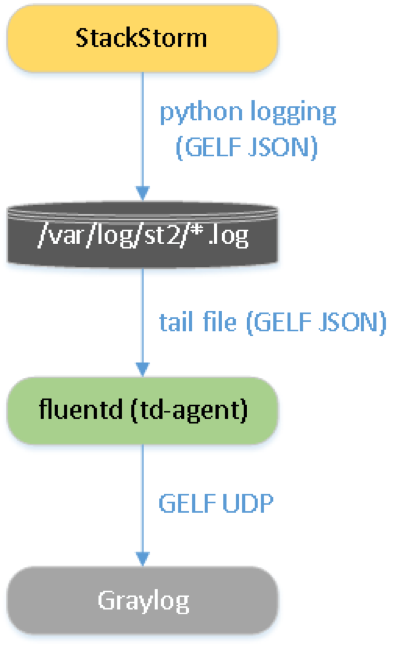
The setup detailed in this blog post will adhere to the following architecture:

First, StackStorm uses the Python logging module to write logs to /var/log/st2/*.log in GELF JSON format. The log shipper Fluentd monitors those log files for changes, reads in any new messages, converts them into GELF UDP format and sends that to Graylog. Finally, Graylog receives GELF UDP and indexes the log messages.

Configuring StackStorm Logging

StackStorm uses Python’s builtin logging module for application level logging. In this module there are two key concepts: formatters and handlers.

A formatter takes a log function call in python code and translates that into a string of text.

Python Logging Call

server = stackstorm.domain.tld
LOG.debug("Connecting to server %s".format(server))

Log String

2017-08-19 11:16:38,767 DEBUG [-] Connecting to server stackstorm.domain.tld

handlers take the log message strings and writes it to some destination. The builtin handlers can write to a file, syslog, UDP, TCP and more.

StackStorm logging configuration files are written in the logging module’s configuration file format. To configure StackStorm to write structured logs we’ll be editing the logging config file stored in /etc/st2/logging.<component>.conf. StackStorm ships with a formatter st2common.logging.formatters.GelfLogFormatter that emits structured logs in GELF format. Luckily StackStorm AUDIT logs utilize the GelfLogFormatter so there is a reference already defined that we can reuse. All we need to do is add another handler to each config that writes the GELF logs to a new file. We can define a new log handler by adding the following to every logging config:


# For all components except actionrunner [handler_gelfHandler] class=handlers.RotatingFileHandler level=DEBUG formatter=gelfFormatter args=("/var/log/st2/st2<component>.gelf.log",) # For actionrunner only (needs a different handler classs) [handler_gelfHandler] class=st2common.log.FormatNamedFileHandler level=INFO formatter=gelfFormatter args=("/var/log/st2/st2actionrunner.{pid}.gelf.log",)

Now that we have a new handler defined we need to tell the logger about it. To accomplish this we’ll need to add gelfHandler to the following sections:

[handlers]
# add ', gelfHandler' the end of the following line
keys=consoleHandler, fileHandler, auditHandler, gelfHandler

[logger_root]
level=INFO
# add ', gelfHandler' the end of the following line
handlers=consoleHandler, fileHandler, auditHandler, gelfHandler

StackStorm should now be configured to write structured logs to /var/log/st2/st2<component>.gelf.log. In order for these changes to be realized we need to restart the StackStorm services. This can be accomplished by either restarting all StackStorm processes:

st2ctl restart

Or we can restart just the components we’ve modified

systemctl restart st2<component>

This is a good time to check /var/log/st2/st2<component>.gelf.log and make sure logs are present.

Astute readers may be asking “if the builtin logging facility provides a UDP handler, why not use it to send logs directly to Graylog?”. The answer is fairly simple, the DatagramHandler which writes log strings to UDP does NOT format the messages in GELF UDP format. GELF UDP requires a special header at the beginning of every packet. To accommodate this we’ll be using Fluentd in the next section to send the log message in GELF UDP format to Graylog.

Configuring the Log Shipper Fluentd

We’re going to use Fluentd to read from /var/log/st2/st2<component>.gelf.log and transform the log messages into GELF UDP format, then send those UDP packets to Graylog.

First we need to install Fluentd v0.14.

Note Fluentd v0.14 is required if you would like sub-second resolution on your logging timestamps. In Fluentd v0.12 timestamps are rounded to 1-second resolution. This causes the messages in graylog to potentially be viewed out-of-order because Graylog doesn’t know which message came first within a 1-second interval.

Below are instructions for installation on RHEL 7, for all other platforms please follow the official documentation here.

Note Fluentd is the name of the log shipping application and it is written by a company called Treasure Data (td). The agent installed on your machine is called td-agent and it wraps Fluentd in a service file that’s specific to your platform.

# add GPG key
rpm --import https://packages.treasuredata.com/GPG-KEY-td-agent

# add treasure data repository to yum
cat >/etc/yum.repos.d/td.repo <<'EOF'
[treasuredata]
name=TreasureData
baseurl=http://packages.treasuredata.com/3/redhat/\$releasever/\$basearch
gpgcheck=1
gpgkey=https://packages.treasuredata.com/GPG-KEY-td-agent
EOF

# update your sources
yum check-update

# install the toolbelt
yum install -y td-agent

# start service
systemctl start td-agent
systemctl enable td-agent

After installation we need to install a Fluentd plugin that implements GELF UDP output formatting.

/usr/sbin/td-agent-gem install fluent-plugin-gelf-hs

Next we need to configure Fluentd to tail the new StackStorm log files we configured in the previous section. The default location for the Fluentd config file is /etc/td-agent/td-agent.conf:

export GRAYLOG_SERVER=graylog.domain.tld
export GRAYLOG_GELF_UDP_PORT=12202
cat >> /etc/td-agent/td-agent.conf << EOF
<source>
  type tail
  format json
  path /var/log/st2/st2actionrunner*.gelf.log
  tag st2actionrunner
  pos_file /var/run/td-agent/st2actionrunner.gelf.log.pos
  enable_watch_timer false
  estimate_current_event true
</source>

<source>
  type tail
  format json
  path /var/log/st2/st2api.gelf.log
  tag st2api
  pos_file /var/run/td-agent/st2api.gelf.log.pos
  enable_watch_timer false
  estimate_current_event true
</source>

<source>
  type tail
  format json
  path /var/log/st2/st2auth.gelf.log
  tag st2auth
  pos_file /var/run/td-agent/st2auth.gelf.log.pos
  enable_watch_timer false
  estimate_current_event true
</source>

<source>
  type tail
  format json
  path /var/log/st2/st2garbagecollector.gelf.log
  tag st2garbagecollector
  pos_file /var/run/td-agent/st2garbagecollector.gelf.log.pos
  enable_watch_timer false
  estimate_current_event true
</source>

<source>
  type tail
  format json
  path /var/log/st2/st2notifier.gelf.log
  tag st2notifier
  pos_file /var/run/td-agent/st2notifier.gelf.log.pos
  enable_watch_timer false
  estimate_current_event true
</source>

<source>
  type tail
  format json
  path /var/log/st2/st2resultstracker.gelf.log
  tag st2resultstracker
  pos_file /var/run/td-agent/st2resultstracker.gelf.log.pos
  enable_watch_timer false
  estimate_current_event true
</source>

<source>
  type tail
  format json
  path /var/log/st2/st2rulesengine.gelf.log
  tag st2rulesengine
  pos_file /var/run/td-agent/st2rulesengine.gelf.log.pos
  enable_watch_timer false
  estimate_current_event true
</source>

<source>
  type tail
  format json
  path /var/log/st2/st2sensorcontainer.gelf.log
  tag st2sensorcontainer
  pos_file /var/run/td-agent/st2sensorcontainer.gelf.log.pos
  enable_watch_timer false
  estimate_current_event true
</source>

<source>
  type tail
  format json
  path /var/log/st2/st2stream.gelf.log
  tag st2stream
  pos_file /var/run/td-agent/st2stream.gelf.log.pos
  enable_watch_timer false
  estimate_current_event true
</source>

<match st2**>
  type gelf 
  host $GRAYLOG_SERVER
  port $GRAYLOG_GELF_UDP_PORT
  protocol udp
  flush_interval 5s
  estimate_current_event true
</match>
EOF

Note estimate_current_event true is used in the config file because the timestamps emitted by StackStorm are rounded to 1-second resolutions. This is fixed in PR #3662 where a new field timestamp_f is added to the GELF logging output. This PR has been merged and should be available in StackStorm v2.4. In these versions you can replace estimate_current_event true with:

time_key timestamp_f
keep_time_key true

Finally we need to restart Fluentd so that the config file changes are realized:

systemctl restart td-agent

Fluentd should now be sending log messages to Graylog, however Graylog is not listening.

Configuring Graylog

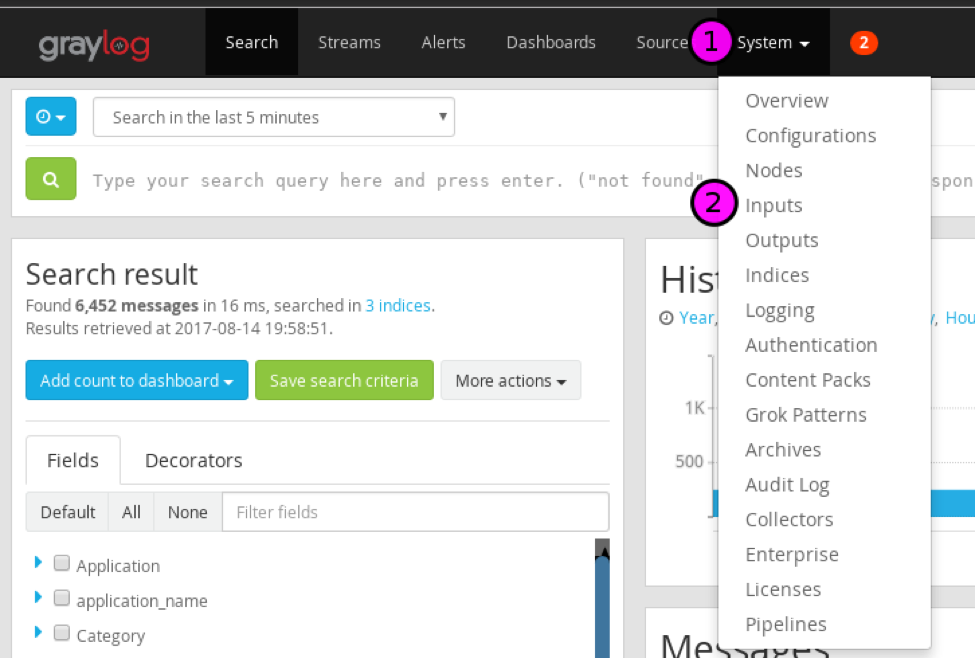
To configure Graylog to receive GELF UDP messages we need to add a new Input. In the Graylog WebUI navigate to System > Inputs:

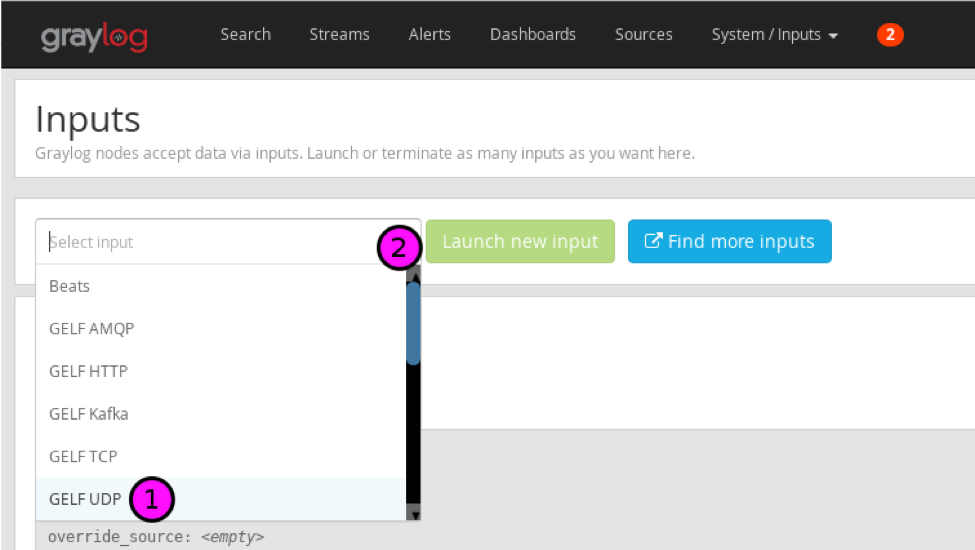
To add a new input click the dropdown Select a new input type: and select GELF UDP then press the button Launch new Input.

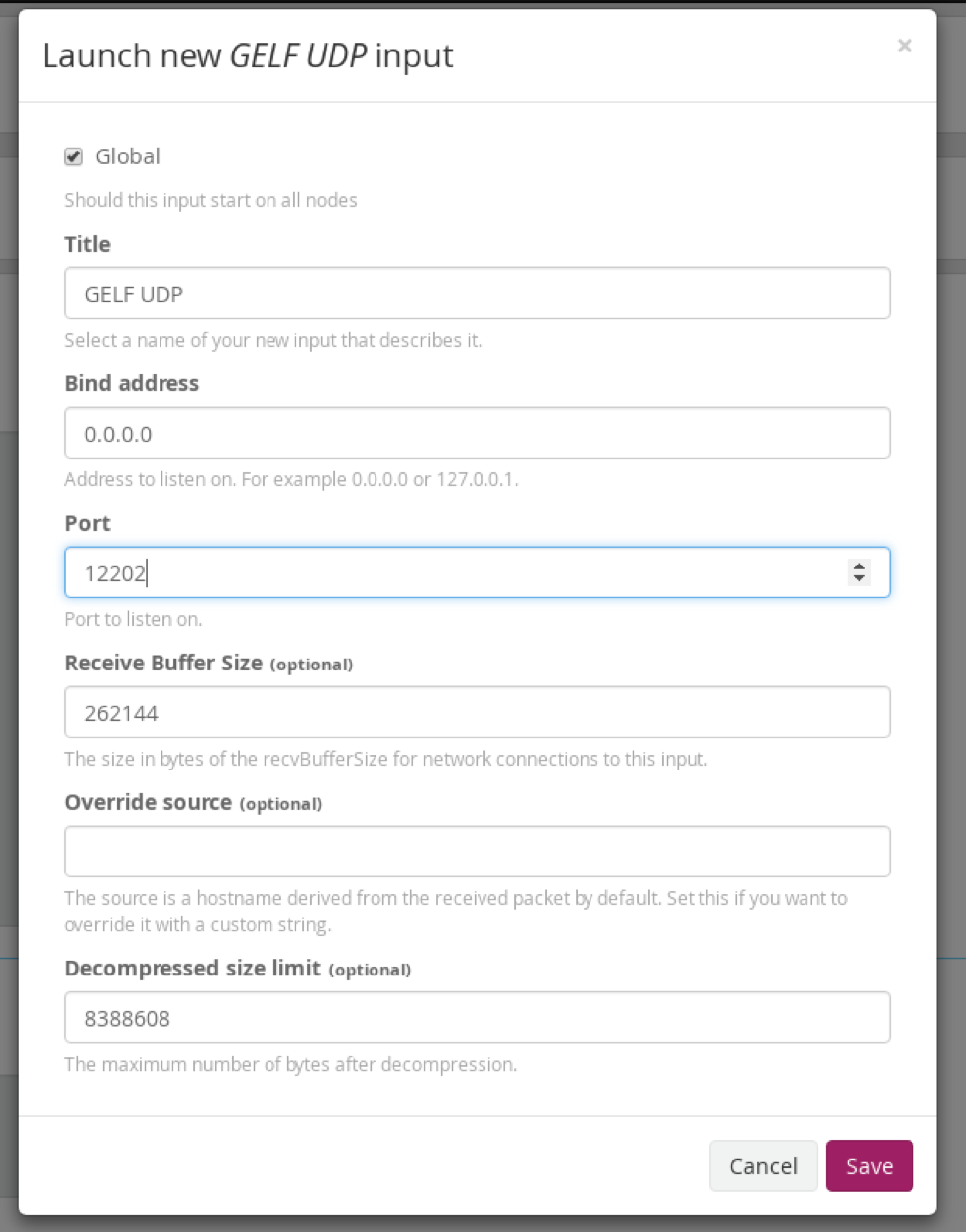
In the new input dialog configure it with the following settings:

  • Global = Yes
  • Name = GELF UDP
  • Port = 12202

Leave all other settings as defaults, and click Save.

Why did we choose port 12202? Graylog, by default, logs its internal logs to udp/12201 so we need to choose a different port to differentiate the inputs. Graylog should now be receiving log messages from StackStorm.

If you’re not seeing any messages flowing in you can always run an action st2 run or restart a service systemctl restart st2api and this should force logs to be written.

Conclusion

We’ve introduced you to structured logging and log shippers, then walked you through the configuration and setup of utilizing these technologies to stream StackStorm logs into the centralized logging application Graylog. Now that we have StackStorm logs into Graylog, what can we do with them? In a future blog post I’ll walk you through creating a dashboard that will provide insight and visualization of your StackStorm deployment.

About The Author

Nick Maludy is the DevOps Manager at Encore Technologies, a company out of Cincinnati Ohio that specializes in Datacenters, Cloud and Managed Services, Professional Services and Hardware Sales. Nick works in the Cloud and Managed Services organization that is focused on providing customers with tailored IT solutions to accelerate their business through automation and modernization.

The post StackStorm Centralized Logging with Graylog appeared first on StackStorm.

What’s This? StackStorm 2.4 Already?

$
0
0

We had said we were planning on releasing StackStorm 2.4 in September. Well, we changed our mind: StackStorm 2.4 has just been released. We wanted to get some of these new features out now, rather than wait. Pack UI, Workflow pause & resume, ChatOps fixes, and more. Read on to see what we’ve done.

Web UI:

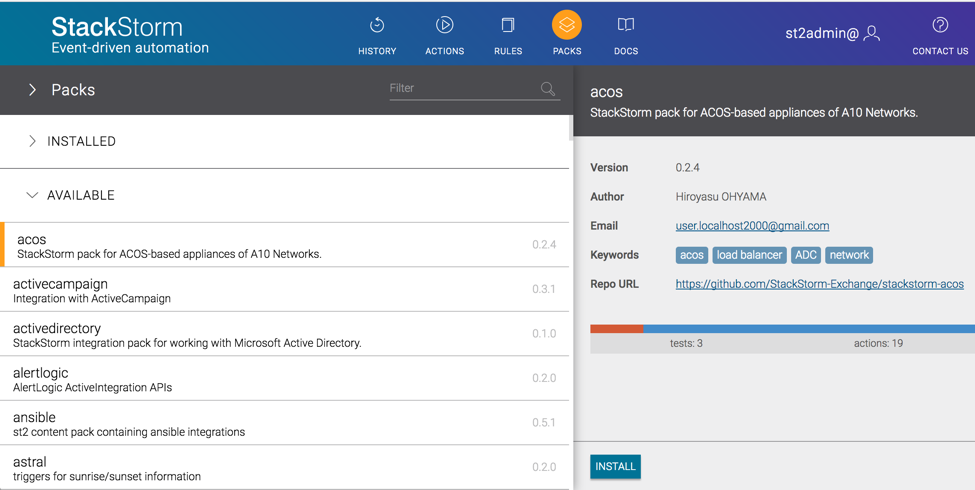
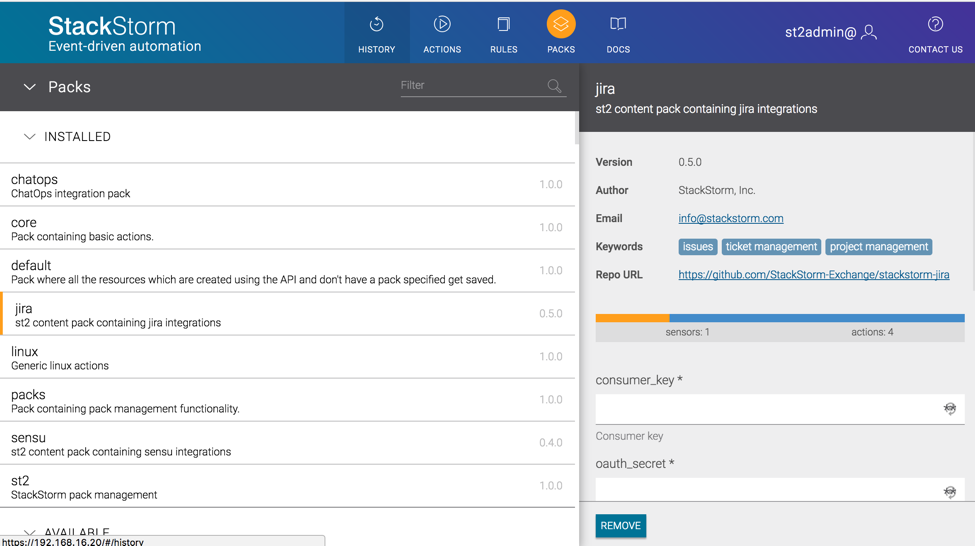
Ooh boy, lots of stuff has been happening here. The first feature you’ll see is the new “Packs” tab:

There’s a lot going on here. You can see your installed packs, and available packs. If you select a pack, you can see some information about the pack, and install it.

You can also configure or remove any installed pack:

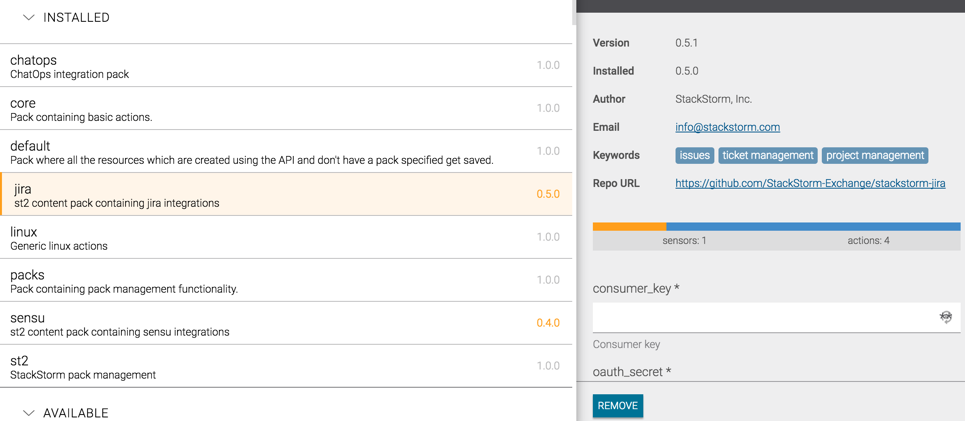
And check this out:

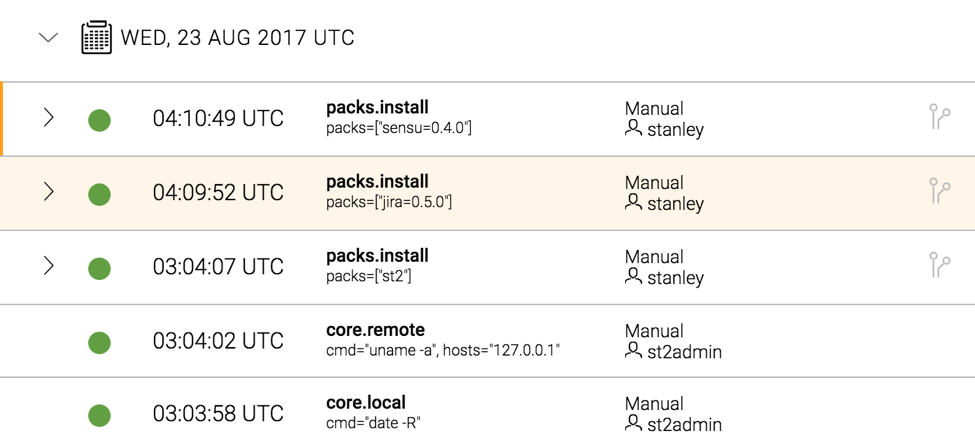
See how the Jira and Sensu packs above have their version number highlighted? Click on that pack, and you can see your current version and the latest version. It’s a quick and easy way to see which of your installed packs have updates available.

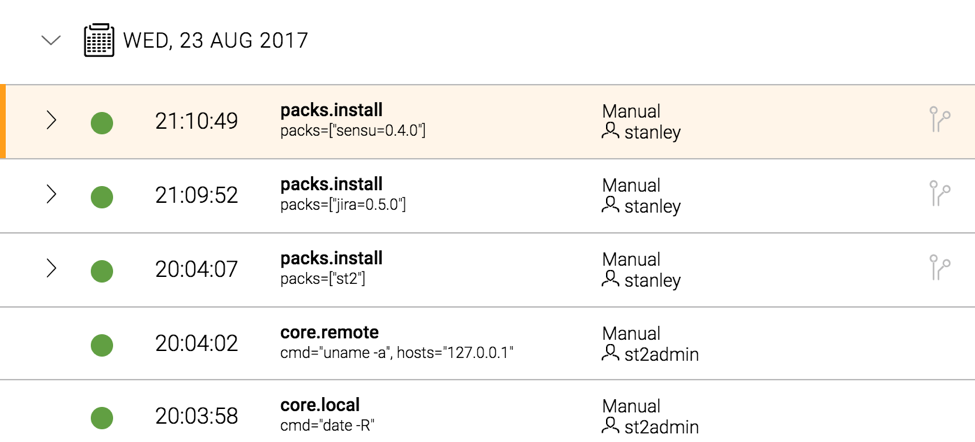
That’s not the only new thing. Click on the History tab, then click on the timestamp next to an entry.

Click on it again. See that?

When you click on the time, it changes between UTC and your local timezone. Nifty, eh?

We’ve also made a few other small fixes and changes, including:

  • Position sorting: Parameters are displayed in the Web UI in this order: Firstly, based upon position value in the action metadata. Then required parameters are displayed in alphabetical order. Finally, any remaining optional parameters are displayed, again in alphabetical order.
  • Arrays can be entered as either JSON or a comma-delimited list.

Workflow Pause & Resume

Mistral and ActionChain workflows can now be paused and resumed. You can run st2 execution pause <execution-id> and st2 execution resume <execution-id> to pause and resume a workflow.

If you pause a workflow, that status flows down to any sub-workflows. You can then resume that individual sub-workflow, which is handy for testing.

This feature lays the groundwork for our upcoming st2.ask feature – see more below.

Configuration Values in Action Metadata

Ever wanted to reference a value from your pack configuration in your action parameters? Now you can. Use the config_context prefix. For example, if your pack configuration contains from_number, you could refer to it in your action metadata like this:

---
...
parameters:
from_number:
type: "string"
description: "Your twilio 'from' number in E.164 format. Example +14151234567."
required: false
position: 0
default: "{{config_context.from_number}}"

ChatOps

ChatOps has also seen some attention with this release. Some of the key points include upgrading Node.js to 6.x and upgrading hubot-slack to 4.3. This fixes multiple issues related to proxies, user highlighting, and improves reliability when Slack gets disconnected.

We’ve also fixed some packaging issues here, which should resolve some issues we saw related to Node.js dependencies. Fewer problems all around in future.

If you’re upgrading, pay attention to the manual steps to upgrade your Node.js version.

Custom Filters Now Available in Mistral Workflows

In previous versions of StackStorm, we provided a number of custom filters to augment what you could do to transform data in your ActionChain workflows. Until version 2.4, these were only available in Jinja snippets rendered within StackStorm, meaning they were not available to Mistral workflows. However, as of 2.4 these have been made available to Mistral workflows as well.

Note also – if you’ve used the st2kv filter to retrieve values from the datastore, that behavior has been modified slightly. It will now no longer attempt to decrypt any encrypted values by default – you must specify this as an optional parameter to that function. Take a look at the upgrade notes for more details.

Miscellaneous Fixes, Changes and Improvements

  • Pack registration will now fail if your pack contains a config.yaml file. This feature was deprecated a while ago, and version 2.3 logged WARNING messages about it. You must migrate to new-style pack configuration. Trust us, it’s worth it.
  • The default version of MongoDB installed on new systems is now v3.4. You can keep using v3.2 on your existing systems, or upgrade. Up to you.
  • When you install a pack via st2 pack install {pack}, it will now tell you how many rules, sensors, and actions it is installing. This gives you a clue that it might take a while if the pack is huge. cough AWS cough.
  • In a related change, we fixed some timeout issues occurring on slower systems when installing large packs. Yes, I’m still looking at you, AWS pack.
  • Specifying arrays of objects when using st2 run is a bit easier now – see #3670.
  • Logrotate configs are now a bit better behaved with stale st2actionrunner log files.
  • Several issues related to the message bus and queue registration have been resolved. Thanks to John Arnold for his help here.

Upgrading

Packages are now available in apt and yum repos. Make sure you backup first, and check the upgrade notes, especially if you’re upgrading from pre-2.2. It’s a good time to update your packs too. Check out the Pack UI to quickly see which installed packs have updates available.

As always, if you run into any problems, get in touch via Slack or GitHub.

What’s Next?

We’re now working on features for 2.5. These include:

  • Streaming API!!! We know, you’ve been asking for this FOREVER. Well, we now have WIP code. If you’re interested in this, please check out PR #3657, and have a read through the comments there.
  • st2.ask – WIP code is here
  • Common pack Python ‘lib’ directory that can be used by both sensors & actions

We’re hoping to ship v2.5 in the next two months.

See you on Slack!

The post What’s This? StackStorm 2.4 Already? appeared first on StackStorm.


New and Improved StackStorm Docker Images!

$
0
0

August 30, 2017
by Warren Van Winckel

Tagged Images

For a little while now, the stackstorm/stackstorm docker image has been tagged with the version of StackStorm that comes pre-installed in the image. Now, you can pin your installation to a specific release of StackStorm! Images tagged with “latest” contain the most recent StackStorm release at the time it was tagged.

The stackstorm/stackstorm:2.4.0 image will always contain the 2.4.0 release of stackstorm. The previous release, 2.3.2, is available at stackstorm/stackstorm:2.3.2. We never again update stackstorm/stackstorm:2.3.2 after 2.4.0 is released. Any feature changes to st2-docker will only ever apply to the most recent stackstorm image.

New Images

I’m proud to announce that two community members have each contributed a new image to the st2-docker repository:

Thanks to @mab27, we have a Docker image called stackstorm-all that contains StackStorm and all dependent services. This may be required when you are only able to run one container, for example, in a CI test environment.

In addition, @shusugmt has contributed the stackstorm-1ppc (stands for “one process per container) Docker image, which allows you to run one service per container – a Docker best practice, following 12FA principles. Please note that in the next day or two, this image will be merged with the base stackstorm/stackstorm image. If you want to take it for a spin in the meantime, an example docker-compose.yml is in runtime/stackstorm-1ppc which uses this 1ppc image.

We have done some early testing of these images on Kubernetes, and have seen good results thus far. You’ll find example manifests under the runtime/kubernetes-1ppc directory. Using a kubernetes “Deployment”, each st2 service can be easily HA enabled by configuring number of replicas to >= 2. For example, you can increase number of Pods which run st2actionrunner by either just using kubectl scale command against st2actionrunner or adjusting the number of replicas in manifest yaml file and use kubectl apply; then all actions are load-balanced among those Pods. (Note: Some components like st2rulesengine or st2sensorcontainer need special care in HA setup, but we don’t describe further details here. See HA section of official doc.)

Currently, this is just a proof of concept but we believe Kubernetes provides an attractive option for those who require StackStorm to run in an HA environment. We greatly appreciate and encourage any PR’s with improvements.

Roadmap

In the next few months, we aim to:

  • Solidify the docs and provide at least one good example of how to deploy using docker-compose, including best practices on how to pull in packs, configs and SSL certs, and how to perform upgrades.
  • Make a list of what is required to move from “eval, light production” to “full production, scale out” for transparency and so others can help out.

Conclusion

We’re really looking forward to hearing stories about what you’re all doing with StackStorm – in particular, with these two new images. As always, find us on our #docker channel on Slack, and please submit issues or PR’s.

The post New and Improved StackStorm Docker Images! appeared first on StackStorm.
August Pack Updates

$
0
0

August has rolled on by, but our Northern Hemisphere users have not been taking a break over summer: StackStorm Exchange updates continue, with new packs and updates. This time, we also have a request for our AWS pack users.

AWS Pack: Your Input Needed

The AWS pack has had a lot of changes this year, and we’re now going through some growing pains. Challenges include pack size (over 3,500 actions!), and a mix of boto2 and boto3. We have an open GitHub issue discussing the future of this pack. We would love to get input from more people using this pack – as always, we want to make things better for our users.

New Pack: vRealize Automation

This new pack includes actions and ChatOps aliases for working with VMware’s vRealize Automation. Check out this post from Martez Reed. Thanks!

Updates to Old Favorites

Here’s some updates and fixes to some existing packs:

  • Napalm: you can now specify the port as a configuration parameter. It was always an optional action parameter, but can now be supplied via configuration.
  • ActiveDirectory: fixed an issue where module loading could confuse pywinrm into thinking an error had occurred. But it hadn’t. Now it doesn’t get confused anymore.
  • Ansible: pack install now includes the necessary dependencies to run playbooks against Windows hosts.
  • Tuleap: New actions, and a change to the underlying Python library location.
  • Slack: we fixed a bug we’d introduced when switching to new Slack APIs, and stopped logging potentially sensitive info.
  • ACOS: Updated version of the acos-client library to use AXAPI 3.0 for changing member status of a ServiceGroup.
  • ActiveCampaign: Fixed a bug with the webhook sensor, where it could block if receiving multiple requests. Could be a problem if you had a busy system.
  • vSphere: You can now set the VM IP address when creating a VM from template.

Thanks to all those that contributed with code and bug reports.

More Contributions Always Welcome

Got an idea for a new pack? Or maybe you’ve written an internal pack, and you’d love to see your name beside so many other cool people at the StackStorm Exchange? Open a Pull Request against the exchange-incubator repo, and we’ll help you through the rest.

The post August Pack Updates appeared first on StackStorm.
StackStorm at SRECon Dublin 2017

$
0
0

The Event: 30th August – 1st September 2017, SRECon EMEA 2017, Dublin, Ireland

Event organiser: Usenix

Site Reliability Engineering is very much the natural evolution of the trusted system administrator and most would agree the SRE role embodies the core principles of DevOps. Google consider these people consultative and of huge value. Software for the masses has changed from monolithic monsters to complex architectures, driving the adoption of new skill sets required for system administrators to evolve to an SRE. It’s no longer about restarting large services at 3am; it’s about keeping the cattle alive and producing milk, whilst at the same time ensuring that the machinery is understood and utilised correctly. This could mean writing custom components to help with performance, availability, telemetry, reporting, managing workloads and dealing with alerts etc. For this gathering of SREs, Usenix chose the location and venue well. Ireland is a techhub for many start-ups and established organisations, most if not all have SREs under employment. Some 600+ people were booked in to the event, with huge attendance from the likes of Demonware, Facebook, Google and Indeed. Many smaller organisations and individuals were also in attendance to gain from the experience of others.

The SRECon agenda was wide and varied. Talking tracks on offer covered everything from building things with gRPC to culture and changing your workplace. Sometimes these kinds of events offer talks which at a surface level attendees do some head nodding but immediately forget. The difference with this group of people is they are enthusiastic and committed and it was clear to see from the corridor conversations and social events over the three days, just how seriously this discipline is taken.

If software forms the core part of a modern business, SREs are the frontline soldiers and events like this provide an opportunity for them to come together, learn and share experiences for the greater good.

StackStorm and SRECon

StackStorm is designed to take the burden away from overworked and under-provisioned operationally involved people, for everything from deployment, testing and auto-remediation. It’s also great for on-boarding new staff and providing a single layer of access to operational ‘stuff’. Events like SRECon are the natural home to talk about and demo StackStorm. We met some great people, had some great conversations and learnt lots about what the attendees were doing for their organisations.

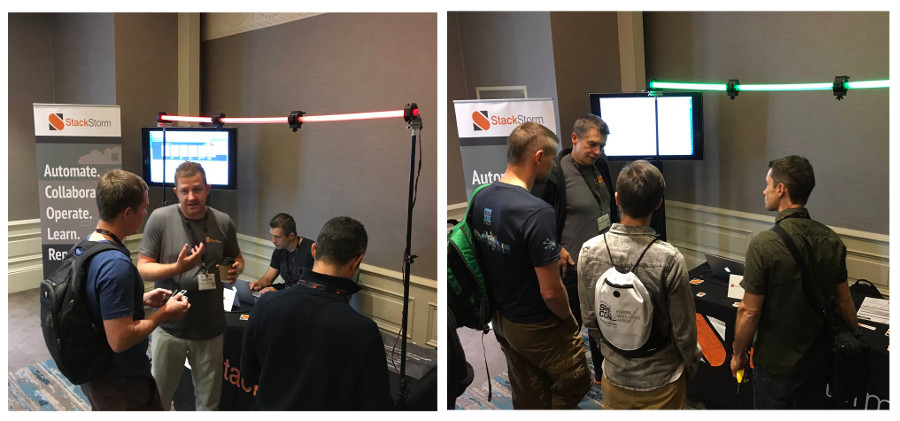
At the StackStorm booth, we had an LED lighting demo, which via a sensor read Tweets from our @Stack_Storm Twitter account. Every time a user Tweeted our username with the hashtag #SRECon, random colour settings would be deployed to the LED lighting tubes. Whilst it wasn’t a walking talking robot or flying car, these demos provide an excellent opportunity to talk about StackStorm. Most SRE operational scenarios can be broken down to an input, decision and an output. For the sake of conversation, decoupling where the input is sourced and what the output does, if this pattern can be applied, then the power of StackStorm can be harnessed. Our lighting demo allowed us to break SREs away from mulling over their domain based challenges for a few minutes using the same familiar thought mechanisms they’re used to dealing with daily.

Going back to the cattle and milk analogy used earlier in this post, StackStorm offers a way to re-use building blocks in workflows. These building blocks are written once, but can be re-arranged many times without a developer being involved. Through the concept of ‘packs’, StackStorm integrates against a myriad of systems and software, which are all downloadable and installable without leaving the platform. The TL;DR? The cattle machinery can be operated by a wider skill set, the quality of the milk is maintained and the cows give you less trouble.

StackStorm at SRECon Dublin

StackStorm at SRECon Dublin 2017

We had many booth conversations over the three days and it was great to be told an SRE or organisation used StackStorm and even better to be told they contribute to the project. SRECon was an excellent event and allowed us to validate that StackStorm is relevant and positioned ideally to deal with the challenges of SREs.

To everyone we met during the three days, for all of the feedback and even the criticisms, thank you for your valuable time and we hope you enjoy the swag.

If you’re wondering how StackStorm can help you and your organisation, hit the landing page here and sign yourself up to our StackStorm community Slack group, where you can chat with existing users and reach out to the core team. Keep an eye out for our new releases and community packs and if you think there’s a gap, come and join the fun and contribute! Don’t forget to follow @Stack_Storm on Twitter for the latest gossip and news of meet-ups and events.

David Gee
StackStorm lover, trainer, contributor

The post StackStorm at SRECon Dublin 2017 appeared first on StackStorm.
Quick One: ST2 2.4.1 is Released

$
0
0

September 18, 2017
by Lindsay Hill

Quick note today: We quietly published StackStorm 2.4.1 last week. Nothing major, just a few bug fixes.

First one: Mistral shutdown with systemd is much faster. The issue has been resolved upstream. We’ve fixed a couple more Mistral-related issues, including better handling of Unicode results.

For our RBAC users, we have fixed a problem where the the system user was being used for pack installation, not the actual user who requested the pack install.

Usual update process applies (backup first!!!).

The post Quick One: ST2 2.4.1 is Released appeared first on StackStorm.
September Pack Updates: Usability

$
0
0

Time for our monthly roundup of new packs on the StackStorm Exchange. This time it’s a new pack for Extreme Networks devices, and usability improvements to the Email, Ansible, Sensu and Napalm packs.

New Pack: EXOS

StackStorm will soon become part of Extreme Networks. As just a little taste of what’s to come, we now have an EXOS pack for running commands on EXOS devices.

Expect to see tighter integration with Extreme Networks devices in future.

Usability Improvements

Here’s a few fixes and changes to make it easier to use some of the existing packs

  • Email: Some elements of the configuration were really confusing. It didn’t really make sense to use accounts under “imap_mailboxes” for outbound email. We’ve overhauled the pack to make things clearer. NB: You must update your configuration to use the new pack. We’re sure the migration will be worth it.
  • Ansible: Handling of JSON values in --extra-vars now works properly.
  • Sensu: The core pack itself hasn’t changed, but now the Sensu handler code is distributed as a Sensu plugin. This means you can install it using sudo sensu-install -p stackstorm on your Sensu server. Much simpler, and easier to automate.
  • Napalm: Improved exception handling, in particular better error messages for when you’ve forgotten to configure the pack, or load the configuration.

Thanks to all those that contributed with code and bug reports.

More Contributions Always Welcome

Got an idea for a new pack? Or maybe you’ve written an internal pack, and you’d love to see your name beside so many other cool people at the StackStorm Exchange? Open a Pull Request against the exchange-incubator repo, and we’ll help you through the rest.

The post September Pack Updates: Usability appeared first on StackStorm.
Microsoft Azure Event Grid explained for StackStorm users

$
0
0

October 05, 2017
by Dmitri Zimine

Two new event-driven systems were introduced last month. Event Grid from Microsoft Azure and Event Gateway from Serverless.com were launched two days apart from each other. An event that triggered these announcements seem to be emitted by Emit conference on serverless. Serverless computing became a primary driver for the event-centric approach, and as serverless architectural patterns emerged, the need for a dedicated event router became apparent.

StackStorm, Event Grid, and Event Gateway are conceptually the same family, despite different target use (devops automation vs serverless) and delivery form-factor (installable vs PaaS). All three are event router services, mapping and routing events from multiple event sources to multiple target systems.

StackStorm pioneered applying the event-driven computing to DevOps automation. Over 4 years of evolving StackStorm, operating it ourselves, and learning from thousands of the users, who have been running StackStorm in a wide variety of applications and scales, we gained a solid perspective on what works well for this class of products. Here, I’ll use this perspective and experience to review and compare the functionality and feature set of the “new kids on the blog” (pun intended).

First, let’s “normalize” the terminology: I use StackStorm terms as a reference point, as StackStorm blog regulars are dearly familiar with them, and add a short explanation for everyone.

StackStorm Event Grid Event Gateway What is it
Sensors Event publishers N/A (out of scope) Event sources and a system responsible for ingesting external events
Triggers Topics Events System representation of the external event
Rules Subscriptions Subscriptions Triggers-to-Actions map, filtering, conditions, data passing
Actions Event Handlers Function Target system invocation

If you’re new to StackStorm, you can refresh refresh the concept of event driven automation at StackStorm documentation.

The common questions to evaluate the event automation products in the family would be:

  • What triggers and actions are possible? What are already available? How can they be extended?
  • How are rules defined? What are the filtering and data transforming capabilities?
  • What are event delivery guarantees, throughput, and scale characteristics?

And of course there is something uniquely interesting in each system. What is it?
With that, let’s start with Event Grid first.

Event Grid by Azure

Event Grid is defined “a fully-managed event routing service that allows for uniform event consumption using a publish-subscribe model, reacting to events in near-realtime fashion”. It is currently in “preview”, supporting only a subset of Azure services. There is documentation and a few examples.

Explaining how Event Grid is different from some seemingly similar Azure services, Clemens Vasters, one of Azure architects, clarifies that it is intended “for the model where there’s a very large number of different events for different contexts emitted by an application or platform service, and a consumer may be interested in just one particular event type or just one particular context.”

Event publishers

Just like StackStorm’s triggers are backed by Sensors, Azure topic types are backed by Event publishers. Currently, they are:

  • Management operation events from Azure Subscriptions or Resource groups and subscriptions (e.g., ‘VM created’).
  • Event hubs – at preview, limited by “Capture” storage event but will likely be a firehose of the interesting events in a future.
  • Custom topics – a point to post HTTP(s) events – similar to StackStorm Webhook trigger. They serve as an open extensibility point, offering API to define and submit custom / 3rd party events. Yes, if you’re outside of Azure, HTTP(s) to a custom topic is the way to push event into Event Grid.

I find myself confused by an overlap with Azure Logic Apps. Logic Apps is primarily an actor/subscriber for an EventGrid, but has it’s own “event-driven” part with an impressive count of 169 event sources called triggers. Triggers mostly follow “poll” model and publish events to Logic Apps, but they are not event sources for EventGrid, unfortunately. Hopefully this confusion is temporary and our Azure friends will find a way to rationalize it.

Topics

Azure Topics are pretty much StackStorm Webhook trigger types. Looking closer, there is a granular picture of Topic Types, Topics, and Events generated by the topic (similar to StackStorm’s Trigger types, Triggers, and Trigger Instances). As mentioned above, “Custom topics” are not the only source of events – other Azure system act as Event Sources and emit events – but they are the one with the open API for solution integration.

Events have id, source reference, subject, and carry a payload in the data object, The schema of data specific to event publisher and schema-less (unlike StackStorm where the event source may choose to publish the schema to help the user refer data for filtering and data transformation).

Event Handlers

Event Handlers are “places where events are sent”, also called “endpoints”. Currently the HTTP/Webhook endpoints, and the Azure Storage Queue are available endpoints, however more event handlers are expected to come. It would be more precise to compare Event Handlers with StackStorm Runners: both abstract a class of endpoints (or “actions). But StackStorm hides this behind “Action” : an action is an action regardless the runner type; even workflow is an action from invocation viewpoint. Event Grid does not offers a dedicated action abstraction of “Action”, like StackStorm or Logic Apps. The target endpoint is defined as part of “Subscription” by endpoint type and endpoint URL (in API, it’s also called Event Subscription Desitnation.

Subscriptions

Subscriptions are comparable to Rules in StackStorm: they map events to target endpoints. In Azure’s words, they “instruct Event Grid on which events on a topic a subscriber is interested in receiving …, and also holds information on how events should be delivered to the subscriber.” Event-to-endpoint mapping is one-to-one. To achieve “fan out” – map one event to multiple endpoints – multiple subscriptions must be created.

Filtering is available, but limited to event type and or event subject pattern. There is no filtering based on event data itself. From my experience with StackStorm, this is a problem as it limits the routing capabilities. For example, reaction on a monitoring event is based on severity, which is a field in event data. Architecturally, it pushes part of event routing logic between EventGrid and the target endpoint. This imperfection already shows: “Message router using Logic apps” is ironically offered as a pattern, where it should be entirely an EventGrid use case.

There is no data transformation: the event data are routed to the target endpoint “as is”. That means the Event Handler needs to know and handle Event Publisher’s data schema. Again, abstraction leaks here: ideally, event routing shall keep entire responsibility of mapping “any” event source to “any” event target without demanding modifications on source or target.
I suspect these limitations are the result of a conscious architectural trade off to not parse event data to gain high throughput. But it could be solved by making subscriptions only parse the events when user user requested filtering on event data or data transformation.

Delivery guarantee

Event Grid clearly declares “at least one” delivery guarantee. That means that once the event is accepted, Event Grid will a) not lose an event, and b) will retry calling an event target on the backoff schedule until it succeeds, or event expires (4 hours in Preview will turn to 24 hours by release). The lack of control over the retry policy is upsetting: retry may help with 503 Service Unavailable or 408 Request timeout but is no use for “401 unauthorized” or “414 URL too long”. I prefer to model “retry” as an action invocation policy, make it dependent both on action type and invocation content, and user configured configured.

In Summary

The most amazing thing about Event Grid is “pricing”: $0.30 for 1 Million operations… Pause here to reflect: it’s $10 a year for one event per second! This hints a giant scale and suggests the use for solutions where routing of massive event flows required, like IoT, or user click analysis. At the current state the model is still maturing, the terminology exposes the org structure (e.g., same things called differently marketecture, docs, API and CLI), and only few event publishers and handlers are available. Well, this is exactly as Preview is supposed to be. The real world usage will inform the roadmap, and I expect it to mature into in a key building block of Azure PaaS.

Event Gateway by Serverless.com

… will be covered in Part 2. Stay tuned!

The post Microsoft Azure Event Grid explained for StackStorm users appeared first on StackStorm.

Serverless’ Event Gateway explained for StackStorm users

$
0
0

October 10, 2017
by Dmitri Zimine

In Part 1 of the series, I shared my excitement with two new event-driven systems introduced last month: Event Grid from Microsoft Azure and Event Gateway from Serverless.com, and posted some observations on Event Grid.

Before we continue with Event Gateway, let’s bring the “terminology normalization” from Part 1. In the table below StackStorm terms are used as as a reference point for our blog’s regular readers, along with a short explanation of their meaning for the guests.

StackStorm Event Grid Event Gateway What is it
Sensors Event publishers N/A (out of scope) Event sources and a system responsible for ingesting external events
Triggers Topics Events System representation of the external event
Rules Subscriptions Subscriptions Triggers-to-Actions map, filtering, conditions, data passing
Actions Event Handlers Function Target system invocation

If you’re new to StackStorm, you can refresh refresh the concept of event driven automation at StackStorm documentation.

The common questions to evaluate the event automation products in the family would be:

  • What triggers and actions are possible? What are already available? How can they be extended?
  • How are rules defined? What are the filtering and data transforming capabilities?
  • What are event delivery guarantees, throughput, and scale characteristics?

And of course there is something uniquely interesting in each system. What is it?
With that, let’s continue to Event Gateway!

Event Gateway by Serverless.com

Event Gateway is defined as “an open-source communication fabric for serverless architectures. It combines both API gateway and pub/sub functionality into a single experience[*].

The “pub/sub” part is what makes Event Gateway an event router, similar to Azure Event Grid. Event Gateway is emphasized as “Cross-cloud”, built to centralize event handling and react to event with any function on any cloud. This positioning reflects anticipation that serverless solutions are going to be spanning multiple cloud providers.
The “API gateway” part is a separate functionality, yet a part of the end-to-end developer experience: it is intended to optimize the synchronous calls to Function-as-a-Service functions of various cloud providers – think of AWS API Gateway functionality across the cloud, without dealing with notoriously painful AWS API gateway configuration.

Event Gateway by Serverless

As a service offering by Serverless.com, Event Gateway is tightly integrated into the serverless framework for a seamless developer experience. How tightly & how seamlessly? Austen Collins demo-ed it at Emit conference and the flow was impressive – watch the video once they post it, and judge for yourself. (I’ll update the post with the link once the video is posted). Or just try yourself – it is open-source: open for contributions, transparent for understanding, and can be run by anyone in their own production cluster. The transparency makes this review an easy job – look at the code, run the example, and let’s compare notes!

Event sources

Event sources are outside of Event Gateway’s scope: the platform doesn’t offers anything like StackStorm sensors – a way to plug-in a piece of code to sense an external event. Instead, EventGrid ingests events via HTTP(s) endpoint. A custom event is most similar to StackStorm WebHook trigger type or EventGrid custom topic. When emitted, triggers an asynchronous call to one or more target functions based on subscriptions.

Events identify themselves by a string ID passed in via HTTP header. Namespacing is not enforced but will likely emerge as a convention. Event payload comes in a HTTP request body and parsed by EventGrid if it is JSON. As event types are not registered upfront, thus there is no payload schema, no static check, and no introspection on which payload parameters may be available for subscription filtering. Well, unfortunately there is no filtering either – I’ll get to it when it comes to subscriptions.

There are also two “built-in” synchronous event types, essential for “just call me” use cases like using functions as client application backends, and function calls across cloud providers (I think of them as part of Event Grid’s API Gateway functionality):

  • invoke event type is used to call functions synchronously. It does not require a subscription: using invoke is like calling StackStorm Action API directly instead of going through the Trigger-Rule-Action chain. The function invocation output is sent in the response body “as is”.
  • http event occurs on HTTP requests on the Gateway paths defined by a special http subscription type. The event carries path, method, query string, headers and the other parameters of HTTP call to the function defined by the subscription. The function execution results are synchronously sent back to the caller in HTTP response

There is also an internal event types. StackStorm users know how powerful internal triggers like st2.generic.actiontrigger can be in building elaborate chains of event reactions. In EventGrid, a few system events are definedgateway.event.received, gateway.function.invoking, gateway.function.invoked, gateway.function.invocationFailed
with intention to add more.Here is an example of using internalFunctionError for error handling. To realize their potential, the system events must become first class citizens, useful in subscriptions, with extra safeguards and usability aids to track the chains of events, break circular dependencies and prevent invocation chain reaction explosions.

Functions

Functions must be pre-registered via configuration API. This is referred as “Function discovery”: it stores information about available functions, allowing the Event Gateway to call them as a reaction to received event. The three function types available today: AWS Lambda, HTTP, and Weighted. Weighted is an interesting concept: the call is load-balanced across a set of functions with probabilities based on each function’s user-assigned “weight”. There will be more function types: the docs already cite Google Cloud Functions, Azure Functions, OpenWhisk Actions. Function providers are not pluggable in the current implementation – adding a new function type to Event Gateway requires modification of the platform code – but it will likely change as more types are implemented. I am particularly looking forward to invoking Step Functions and Logic Apps as the workflows will be used more to tame serverless complexity – and adding support for them looks pretty easy.

Subscriptions

Subscriptions map events to functions. Created via the same configuration API, subscriptions are as simple as Event Gateway’s, even simpler: just (functionID, event)` tuple. It does no filtering on event, and doesn’t offer any data transformation from event payload to function input, passing event payload to function as is. The lack of filtering pushes part of event routing responsibility onto functions: users will have to either mix routing and domain logics in function, or front-face the handlers by a “routing” function. The lack of data transformation creates data coupling between events and functions. This is unfortunate: the promise of Event Gateway is that it “completely decouples functions from one another, reducing communication costs across teams, eliminates effort spent redeploying functions, and allows you to easily share events across functions, HTTP services, even different cloud providers”, and in it current form, it’s not “completely decoupled”. However event filtering is already on the roadmap and well thought out. Data transformation is not yet in the plans, but from our experience with StackStorm it will be necessary.

A special HTTP subscription is used to define an HTTP API endpoints by mapping paths and methods to synchronous function calls. HTTP subscription is created when the event type is http, and takes path and method parameters. There can be only one http subscription for the same (method, path) pair. It was not easy to get my head around special case for http at first, but now I find it easy to think about it as API Gateway functionality, and it is a very convenient way to expose functions as REST endpoints.

Delivery Guarantee and Scale

Event Gateway is a horizontally scalable stateless service. It relies on strongly consistent DB (etcd, Consul, Zookeeper) for managing state and inter-cluster communications. A cluster can span multiple cloud regions or even various cloud providers.

Delivery guarantee is not specified; from looking at the code I would guess “at most once” but happy to be corrected. Retry is left to the event emitting clients for the time and cited as a feature request.

Serverless Framework Integration

What makes Event Gateway really appealing is the convenience of integration with Serverless framework. User describes the event-action mapping with already familiar syntax in serverless.yml, and the framework makes all the calls to register a function & create a subscription:

functions:
  analytics:
    handler: recordEvents
    events:
      - user.registered
      - user.clicked

Here is how the end-to-end developer experience is promising to be, once the Event Gateway is out in production:

  • Define your solution as a combination of events, functions, and subscriptions with familiar serverless framework syntax. Use the sync http events for client app backend services, invoke events to synchronously call functions from functions, and custom async events for orchestrating backend jobs.
  • Try locally: develop and test the solution with Event Gateway automatically deployed and running locally, along with local simulators of FaaS and some other “serverless-offline” goodies.
  • Deploy to clouds: with sls deploy, the functions will be deployed to the cloud providers, registered in Event Gateway via functional discovery, and event subscriptions will be created.
  • Emit events & profit!

Summary

Event Gateway is currently in beta, and under active development (the development noticeably slowed down since it’s peak in August, which, I must admit, concerns me). While AWS, Azure, Google GCP & IBM OpenWhisk are mentioned in docs, only AWS is implemented at the time of writing. The hosted service is not available yet: one can run Event Gateway locally via Serverless framework, or standalone.

Event Gateway is hardly useful at the current early preview stage, but looks very promising on its roadmap. A cross-cloud event router is “the missing piece of serverless architectures[*], and Event Gateway makes a strong claim to this strategic spot. The combination of pub/sub and API gateway functionality provides single developer experience – the majority of solutions need both types of interactions. In addition, Event Gateway promises to serve as an “event store” – keep events long after execution to enable event-sourcing. Open-source model brings trust and carries the potential of a strong community support. I am looking forward to seeing Event Gateway develop towards achieving its grand vision.

The post Serverless’ Event Gateway explained for StackStorm users appeared first on StackStorm.
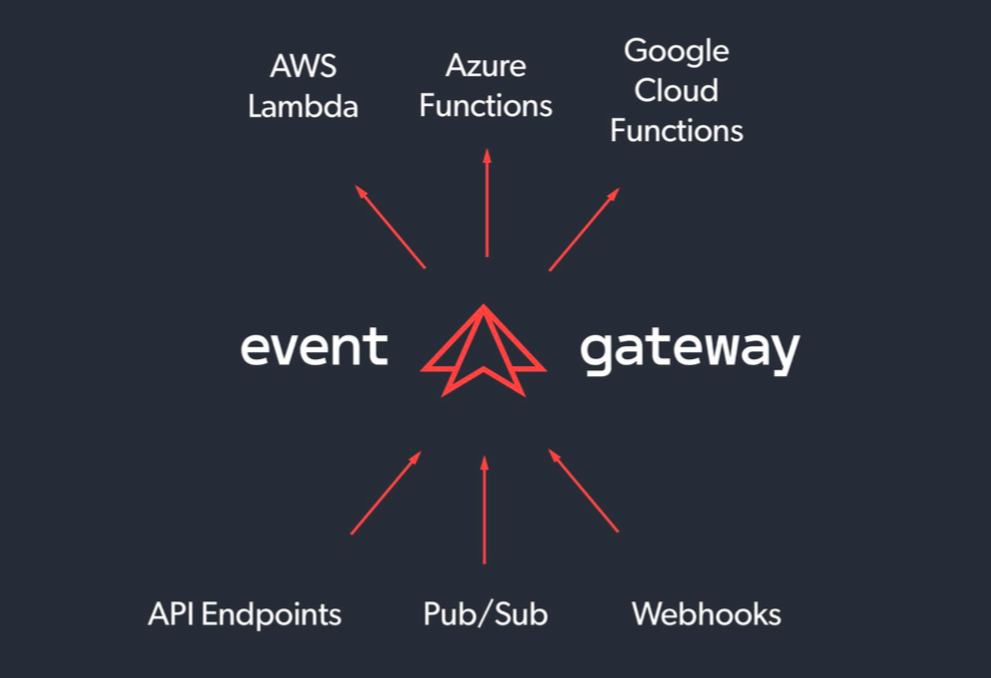

StackStorm 2.5 Has Hit the Streets!

$
0
0

We are very pleased to announce that StackStorm v2.5 has shipped, including two big new features – Streaming Output, and the Inquiry Runner, aka st2.ask. Read on for more details about the new features:

Real-time Action Output Streaming

It’s here at last! You can now see action output as it is received, rather than having to wait for them to complete, or time out. Super-useful for long-running actions, and debugging new workflows.

After kicking off an action, run st2 execution tail {ID} – or just st2 execution tail last, to see real-time output from the most recent execution.

$ st2 run mypack.my_long_running_action
$ st2 execution tail last
stderr -> Line: 7
stdout -> Line: 8
stderr -> Line: 9
stdout -> Line: 10
Execution 59a7f8260640fd686303e628 has completed.

Right now this is available via CLI and API. In future we’ll expose this via the Web UI. Check out the docs.

This feature is still experimental, and is disabled by default. To enable, set stream_output = True in the [actionrunner] section of st2.conf, and restart all ST2 services. In future it will be enabled by default.

Inquiries, aka st2.ask

Have you ever wanted to pause a workflow and get approval before proceeding? Or maybe stop and ask for a second authentication factor? The new core.ask action is for you. This is part of what we call Inquiries.

To use it, define a core.ask step in your workflow, e.g.:

chain:

  - name: task1
    ref: core.ask
    params:
      route: developers
      schema:
        type: object
        properties:
          secondfactor:
            type: string
            description: Please enter second factor for authenticating to "foo" service
            required: True
    on-success: "task2"

  - name: task2
    ref: core.local
    params:
      cmd: echo "We can now authenticate to "foo" service with {{ task1.result.response.secondfactor }}"

When the workflow runs, it will pause after the core.ask step. You can then use Rules to define how you want to notify users.

You can see inquiries awaiting a response with st2 inquiries list, and then answer an inquiry:

~$ st2 inquiry respond 59d1ecb732ed353ec4aa9a5a
secondfactor: bar
Please enter second factor for authenticating to "foo" service

 Response accepted. Successful response data to follow...
+----------+---------------------------+
| Property | Value                     |
+----------+---------------------------+
| id       | 59d1ecb732ed353ec4aa9a5a  |
| response | {                         |
|          |     "secondfactor": "bar" |
|          | }                         |
+----------+---------------------------+

This is a new feature, and we’re still seeking feedback on it. We expect it to be fully ‘productized’ in version 2.6. If you are using inquiries, we recommend checking the garbage collection settings.

Installation Improvements

Our installation scripts have been enhanced to deal with a wider variety of situations. This should make “one-line” installs more reliable, and usable by more people. Less need to switch to manual install.

  • Proxy servers now work with the installation scripts.
  • ~stanley no longer has to be /home/stanley, for those crazy kids that like to set DHOME to something like /var/export/home.
  • Installation script output is now logged to file under /var/log/st2, in addition to on-screen display.
  • Installer scripts handle re-runs better. Not fully idempotent yet. But it can pick up from earlier failures better.
  • BWC + Automation Suites installer scripts better handle it when StackStorm is already installed.

And More!

We have of course included several smaller fixes and enhancements in this release. Some of these were contributed by the community, and we remain deeply grateful for that. One that we want to highlight is that ChatOps now supports Rocket.Chat support. If you want to host your own Chat server internally, but don’t want something that looks like it came from the 90s, Rocket Chat might be for you. Thanks to Andrew Jones.

Full details in the changelog.

Packages are now available in apt and yum repos. Make sure you backup first, and check the upgrade notes, especially if you’re upgrading from pre-2.2. If you are using the Brocade DC Fabric Automation Suite, make sure you upgrade that at the same time – we’ve made some under the hood packaging changes.

As always, if you run into any problems, get in touch via Slack or GitHub.

The post StackStorm 2.5 Has Hit the Streets! appeared first on StackStorm.

New in StackStorm 2.5: Inquiries

$
0
0

October 31, 2017
by Matt Oswalt

StackStorm 2.5  introduces one of our most highly requested features: “Inquiries”. Inquiries are a way of “asking a question” in the middle of a workflow (Mistral or ActionChain), to get additional data before moving on.

For instance, while you can store service credentials in the StackStorm datastore and retrieve them using a Jinja snippet, some services require two-factor authentication. It’s necessary, therefore, to be able to pause the workflow at a certain point, and allow a human to “inject” this data into the workflow midstream. There are a number of other use cases for this functionality, including the simple “I’m about to do something stupid dangerous, should I proceed?”.

Before we get into Inquiries and how they work, an important note: we’ve been working hard on making sure the new feature is useful for a variety of use cases, and as robust as possible. However, it is a complex and fairly low-level feature that has a lot of moving parts, and before recommending it for production use, we’d like to spend a release cycle gathering feedback on the API and the user experience. So, for 2.5, we would love for you to use this feature in your test/dev deployments of StackStorm and let us know what you think. Don’t worry, this is not going to stay “alpha” forever! We expect that it will be “production ready” in StackStorm 2.6, due to ship later this year.

New Action – “core.ask”

In order to make use of Inquiries in a workflow, we’re introducing a new action: “core.ask”. In order to “ask a question” in your workflow, simply use this action where you would like this question to be asked.

The “core.ask” action supports a number of parameters, but the most important one by far is the ”schema” parameter. This parameter defines exactly what kind of responses will satisfy the Inquiry, and allow the workflow to continue. When users respond to this Inquiry, the response data that gets sent to the StackStorm API must validate against this schema in order to satisfy the Inquiry and allow the workflow to continue. It sounds a bit complicated, but don’t worry, the “st2” client makes it easy to put together a valid response. We’ll walk through that soon.

Here’s a simple ActionChain that uses “core.ask” to ask for a second-factor authentication parameter using “core.ask”:

chain:

  - name: task1
    ref: core.ask
    params:
      route: developers
      schema:
        type: object
        properties:
          secondfactor:
            type: string
            description: Please enter second factor for authenticating to "foo" service
            required: True
    on-success: "task2"

  - name: task2
    ref: core.local
    params:
      cmd: echo "We can now authenticate to "foo" service with {{ task1.result.response.secondfactor }}"

Executing this workflow results in a “pending” status for “task1”, and the ActionChain itself is “paused”.

~$ st2 run examples.chain-test-inquiry
.
id: 59d1ecb632ed353f1f340898
action.ref: examples.chain-test-inquiry
parameters: None
status: paused
result_task: task1
result:
  roles: []
  route: developers
  schema:
    properties:
      secondfactor:
        description: Please enter second factor for authenticating to "foo" service
        required: true
        type: string
    type: object
  ttl: 1440
  users: []
start_timestamp: 2017-10-02T07:37:26.854217Z
end_timestamp: None
+--------------------------+---------+-------+----------+-------------------------------+
| id                       | status  | task  | action   | start_timestamp               |
+--------------------------+---------+-------+----------+-------------------------------+
| 59d1ecb732ed353ec4aa9a5a | pending | task1 | core.ask | Mon, 02 Oct 2017 07:37:27 UTC |
+--------------------------+---------+-------+----------+-------------------------------+

The workflow will remain paused until a response is received that validates against the provided schema.

Viewing and Responding to Inquiries

A new subcommand: “st2 inquiry” has been added to the StackStorm CLI. Using this, you can “list” existing Inquiries, “get” a specific Inquiry, or “respond” to an Inquiry.

“st2 inquiry list” shows a summary of existing Inquiries:

~$ st2 inquiry list
+--------------------------+-------+-------+------------+------+
| id                       | roles | users | route      | ttl  |
+--------------------------+-------+-------+------------+------+
| 59d1ecb732ed353ec4aa9a5a |       |       | developers | 1440 |
+--------------------------+-------+-------+------------+------+

Like most other resources in StackStorm, we can use the get subcommand to retrieve details about this Inquiry, using its ID provided in the previous output:

~$ st2 inquiry get 59d1ecb732ed353ec4aa9a5a
+----------+--------------------------------------------------------------+
| Property | Value                                                        |
+----------+--------------------------------------------------------------+
| id       | 59d1ecb732ed353ec4aa9a5a                                     |
| roles    |                                                              |
| users    |                                                              |
| route    | developers                                                   |
| ttl      | 1440                                                         |
| schema   | {                                                            |
|          |     "type": "object",                                        |
|          |     "properties": {                                          |
|          |         "secondfactor": {                                    |
|          |             "required": true,                                |
|          |             "type": "string",                                |
|          |             "description": "Please enter second factor for   |
|          | authenticating to "foo" service"                             |
|          |         }                                                    |
|          |     }                                                        |
|          | }                                                            |
+----------+--------------------------------------------------------------+

Since the schema is included in the Inquiry details, the client knows what kind of data is required to formulate a valid response. The “st2 respond” command will step through each of the properties in the schema, prompting you with the text in the “description” field for each property:

~$ st2 inquiry respond 59d1ecb732ed353ec4aa9a5a
secondfactor: bar
Please enter second factor for authenticating to "foo" service

 Response accepted. Successful response data to follow...
+----------+---------------------------+
| Property | Value                     |
+----------+---------------------------+
| id       | 59d1ecb732ed353ec4aa9a5a  |
| response | {                         |
|          |     "secondfactor": "bar" |
|          | }                         |
+----------+---------------------------+

If the response is accepted, the valid response payload will be printed to the screen, and the workflow that initially raised the Inquiry will continue. Note that the workflow we showed in the previous example now shows both tasks executed, and marked with a “succeeded” status:

~$ st2 execution get 59d1ecb632ed353f1f340898
id: 59d1ecb632ed353f1f340898
action.ref: examples.chain-test-inquiry
parameters: None
status: succeeded (468s elapsed)
result_task: task2
result:
  failed: false
  return_code: 0
  stderr: ''
  stdout: We can now authenticate to foo service with bar
  succeeded: true
start_timestamp: 2017-10-02T07:37:26.854217Z
end_timestamp: 2017-10-02T07:45:14.123405Z
+--------------------------+------------------------+-------+------------+-------------------------------+
| id                       | status                 | task  | action     | start_timestamp               |
+--------------------------+------------------------+-------+------------+-------------------------------+
| 59d1ecb732ed353ec4aa9a5a | succeeded (0s elapsed) | task1 | core.ask   | Mon, 02 Oct 2017 07:37:27 UTC |
| 59d1ee8932ed353ec4aa9a5d | succeeded (1s elapsed) | task2 | core.local | Mon, 02 Oct 2017 07:45:12 UTC |
+--------------------------+------------------------+-------+------------+-------------------------------+

Also notice that the output for this workflow contains the value we passed in to the response, “bar”. You can use the same method to pass a specific field in the response payload to another action.

Conclusion

This was a very light introduction to Inquiries. Please see the Inquiries documentation for more information on:

  • How to secure Inquiries and restrict who can respond
  • Notifying users about new Inquiries that require their response
  • Garbage collection for Inquiries – cleaning them up after a certain period of time

We’re excited to finally release this functionality to you, and we look forward to gathering your feedback on Inquiries. We have a lot more planned that will build on top of this functionality (like tighter Chatops integration with Inquiries) and we want to make sure we get this right. So, get inquiring!

The post New in StackStorm 2.5: Inquiries appeared first on StackStorm.

October Pack Updates

$
0
0

November 1, 2017
by Lindsay Hill

More packs, more updates, more goodness. Here’s October’s roundup of new & changed packs. Zabbix, Keycloak, Foreman, Solarwinds and more. Plus a couple of proposals for pack changes to Kubernetes and AWS, and a warning about upcoming Python action changes.

New Packs!

  • Napalm Logs: You’ve probably already heard of the Napalm network automation project – this is a sister project that aims to normalise network device syslog messages. This sensor lets you turn those logs into ST2 triggers.
  • Keycloak: Actions for working with Keycloak, an Open Source Identity and Access Management system.

  • Zabbix: You have always been able to submit webhooks from Zabbix to ST2. But now we have an integration pack, and a well-documented story on how to raise triggers in ST2 when things happen in Zabbix.

Noteworthy Updates

Here’s a few of the more interesting pack changes in October:

  • Solarwinds Orion: Added multiple new actions for querying agent information, deleting nodes, and allow setting nodes to be unmanaged for a specific time in future.
  • Foreman: Actions are now auto-generated from the Foreman API. Be warned: This is a breaking change. Read the README. We think the change is worth it.

  • Rabbitmq Fixed a long-standing bug where the sensor always returned the last queue name. This was a bit annoying if you were trying to monitor multiple queues.

RFC #1: AWS Pack Changes

We have been having discussions about the future of the AWS Pack. One approach is to have a separate pack per AWS service. Andy Moore has generated a whole bunch of example PRs to show what this looks like. Got some feedback on this approach? Please weigh in.

RFC #2: Kubernetes Pack

The Kubernetes API can change between versions. AndyMoore proposes that we align our pack versions with the Kubernetes version. So if you are running Kubernetes v1.4, you would install the v1.4 version of the ST2 pack with st2 pack install kubernetes=1.4. This seems sensible to me. Agree? Disagree? Let us know via that GitHub issue.

Technical Note: Changed Action Import Path

If you are writing Python actions, pay attention to this change. We have changed the Action import path. Previously most Python actions would have this line:

from st2actions.runners.pythonrunner import Action

This should now be:

from st2common.runners.base_action import Action

Right now both styles will work, but we will remove the older option in StackStorm 2.7. We are in the process of updating all packs on the Exchange.

Want to add your own pack?

No problem – just submit a PR against exchange-incubator. We’ll help you through the rest. It’s pretty easy, and we promise not to bite.

The post October Pack Updates appeared first on StackStorm.

StackStorm goes to Extreme

$
0
0

November 2, 2017
by Dmitri Zimine

As of this week StackStorm is officially a part of Extreme Networks. We’ve changed hands 3 times in 18 months. We’ve survived 365 days of uncertainty. It’s over now. The future is certain and bright, more good stuff is coming soon. Seriously, it’s all good.

Source: Brocade’s “On-second-though” collection. Check it out, it’s fun.

Here is the scoop for those of you who don’t closely follow corporate M&A stories. This very day, on Nov 2nd last year we got breaking news: Broadcom is buying Brocade. It had only been 7 months since Brocade acquired StackStorm. We were barely settled there…and to make it really interesting: Broadcom announced that it divests Brocade’s network assets. We were up for sale. In parts. Publicly. Quite an unusual situation. Even more so when it lasts half a year. Half-a-year of free fall until finally Extreme popped up and snagged Brocade’s networking cake with StackStorm cherry on top. Then another half-a-year of hanging out in mid-air with the landing date jumping further away, just when we thought we were about to land. You can guess what it could possibly do with productivity, morale, working visa situations, ability to attract, hire, and keep talent, budgets, community marketing, planning, innovation…
I can’t express enough my pride and gratitude to our incredible team going through these tough and tiring times with performance and style. We launched StackStorm Exchange, continued to deliver new and exciting features like new Pack management, Docker support, Realtime action output, and st2.ask. We kept holding up the community and supporting our paying customers. We’ve cranked out 5 releases and 6 patches. Most importantly, we held the team together, and through tough times our team’s bond was made stronger. As a team, we decided to go to Extreme.

Why do we see Extreme as a good home for StackStorm? Because uncertainty ends. Becoming a part of $1B+ mothership that challenges Cisco gorilla in Gartner magic quadrant does bring more certainty to StackStorm (and to you, the users of the project) than we ever had before. But what else? Honestly I was quite skeptical at first: Extreme Networks? Are they even still alive? Can it possibly be any good? Yes it can. During last 5 months of working with Extreme’s engineering team, I’ve learned that the company has re-invented itself. Their team is charged with the mission, the new management created a culture of directional clarity, transparency, execution focus, and straight talk – a culture where StackStorm team is – finally – a fit. Ah, and also much fun playing with the name: StackStorm goes to Extreme!

What is next?
Our strategy stands: we continue to build StackStorm open-source platform, as well as to offer a commercial version, for the broadest variety of automation use cases (StackStorm does not become a networking product). We accelerate the growth of our community around StackStorm Exchange integration packs, and welcome more contributions to the st2 core. In addition, we continue to help other teams at Extreme who increasingly use the StackStorm platform to reinvent network automation.

Big thanks to our users and community for sticking with us through the tough times.
The future is certain and bright, more good stuff is coming soon.

PS. We are hiring! Shoot an email to moc.mrotskcatsnull@sboj & tell us something great about yourself.

The post StackStorm goes to Extreme appeared first on StackStorm.

New in StackStorm 2.5: Real-time action output streaming

$
0
0

November 07, 2017
by Tomaz Muraus

StackStorm v2.5.0 has been released recently. In addition to Inquiries, it includes another widely requested feature – real-time output of actions.

Real-time action output streaming allows users to see any output produced by an action in real-time.

This makes troubleshooting and debugging actions much easier and faster. It is especially handy in environments where StackStorm is used as a CI / CD tool and for long running actions (do you have a long running action which builds and installs a software package and you want to see the progress in real-time? Now that and a lot more is possible).

Prior to this release, it was only possible to see the output once the action has finished (well, there were some workarounds which involved using “tail” command, but those workarounds had many limitations and issues).

Real-time action output streaming

We have done a lot of testing of this feature, but it is still considered experimental in this release and as such, it’s behind a feature flag. To enable it, set actionrunner.stream_output = True property in st2.conf and restart all services (sudo st2ctl restart).

Pending no major issues or blockers, the streaming feature will be enabled by default in the next major release.

Right now the feature is supported for all the most commonly used runners (local, remote, python runner).

Consuming action output in real-time

Immediately after the action execution has been scheduled you can start consuming the output either by using the CLI or API:

CLI

We have added a new “st2 execution tail” command. This command consumes events from the event-stream API and prints any output as soon as it’s available.

st2 execution tail <execution id> [–include-metadata] [–type=stdout/stderr]

The command also supports simple workflows which are not nested – it will automatically follow any new action which which is kicked off by the workflow and tail and print the output of it.

The video above shows an example of this command in action. In this example we ran the “packs.install” action and then tailed the output of it. As you can see, we did not provide an “execution id” argument to the command. By default, if no execution id argument is provided, it will default to “last” and tail the last execution in the system.

StackStorm API

In addition to the CLI, you can consume the output using the new GET /v1/executions/<execution id>/output[?type=stdout/stderr/other] API endpoint.

This is useful in situations when you might not have access to the CLI and when you want to consume the output quickly and easily. The API endpoint keeps a long running connection open until the execution completes (or until the user closes the connection) which means you can simply curl the URL and any output will be shown as soon as it’s available.

StackStorm Stream API

If you want to access the output programmatically, the best way to do that is using the event-stream API endpoint. Event-stream API endpoint follows the server-sent event specification and any change which is made to a StackStorm resource is reflected in the event-stream (e.g. an event is dispatched when an execution has been scheduled, when it starts running, when it completes, etc.).

The name of the event for the action output events is st2.execution.output__create.

WebUI

Right now real-time output is only available via CLI and the API. We plan to add support for it to the WebUI in future, once the feature comes out of the experimental phase.

Conclusion

We are excited and happy to finally be able to bring you this widely requested feature. We encourage you to try it out and as always, if you have any questions / comments / feedback, please get in touch.

This post served as a brief introduction. For more information and more in-depth examples, please refer to the documentation – Real-time Action Output Streaming. If you are interested in the implementation details and want to dig deeper, the following PRs should serve as a good starting point – 3657, 3729.

The post New in StackStorm 2.5: Real-time action output streaming appeared first on StackStorm.

Viewing all 302 articles
Browse latest View live


Latest Images